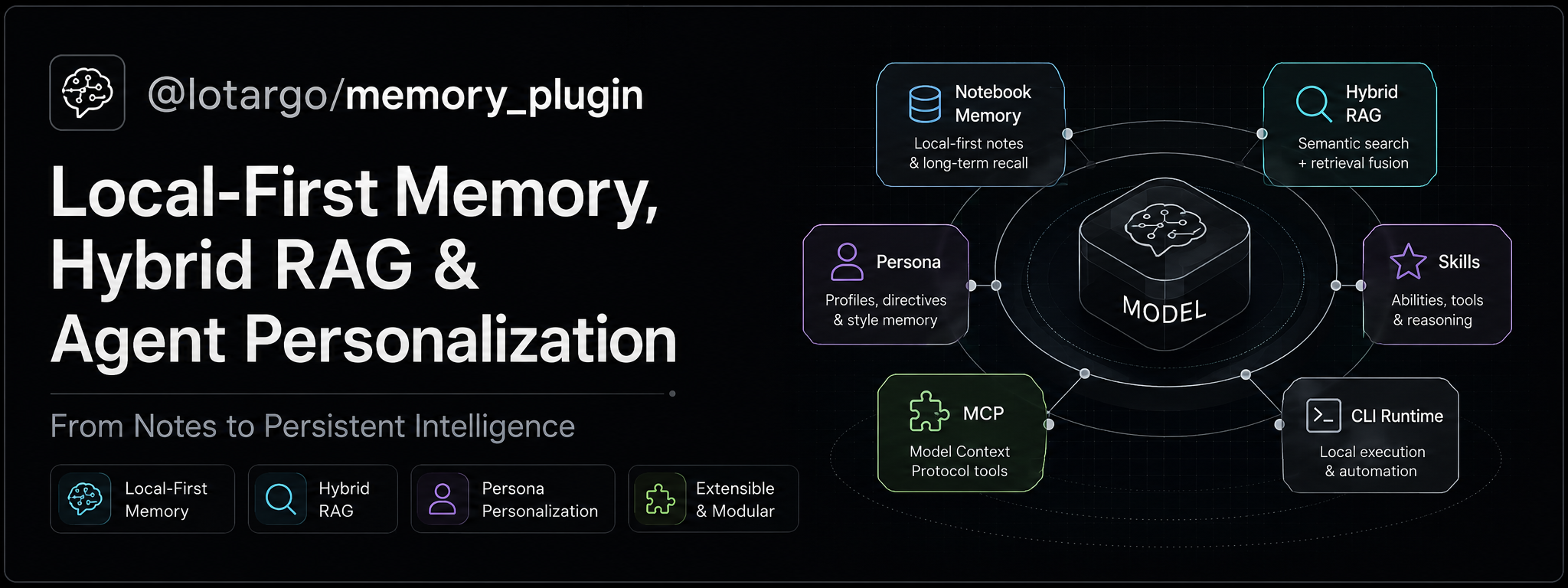






Local-first long-term memory, hybrid RAG, and agent personalization for AI coding agents
One memory system for OpenCode, Codex, Claude Code, Gemini CLI, Antigravity, Google Jules, and other MCP clients.
@lotargo/memory_plugin — Local-First Memory, Hybrid RAG & Agent Personalization
Quick Start · Memory Architecture · Persona · RAG & Retrieval · Cloud Sync · Clients · Security
Why This Project Exists
AI coding assistants forget user preferences, architectural decisions, investigations, and project context when a session ends. They also tend to mix very different kinds of information into one oversized prompt.
@lotargo/memory_plugin separates persistent knowledge into the right storage class:
| What you want to preserve | Tool | Storage behavior |
|---|---|---|
| Concise facts, preferences, constraints, conventions, and persona settings | remember |
Hot Notebook memory; available during session initialization |
| Detailed decisions, research, investigations, experiments, and handoffs | remember_note |
Cold RAG Memory Note; searchable but not injected into every session |
| Files, URLs, documentation, reports, specifications, and code | ingest_document |
Curated external knowledge in the RAG index |
The same engine adds Git-based project isolation, semantic search, full raw-source expansion, explicit fact-to-document links, optional Turso synchronization, and native OpenCode auto-injection.
Architecture at a Glance
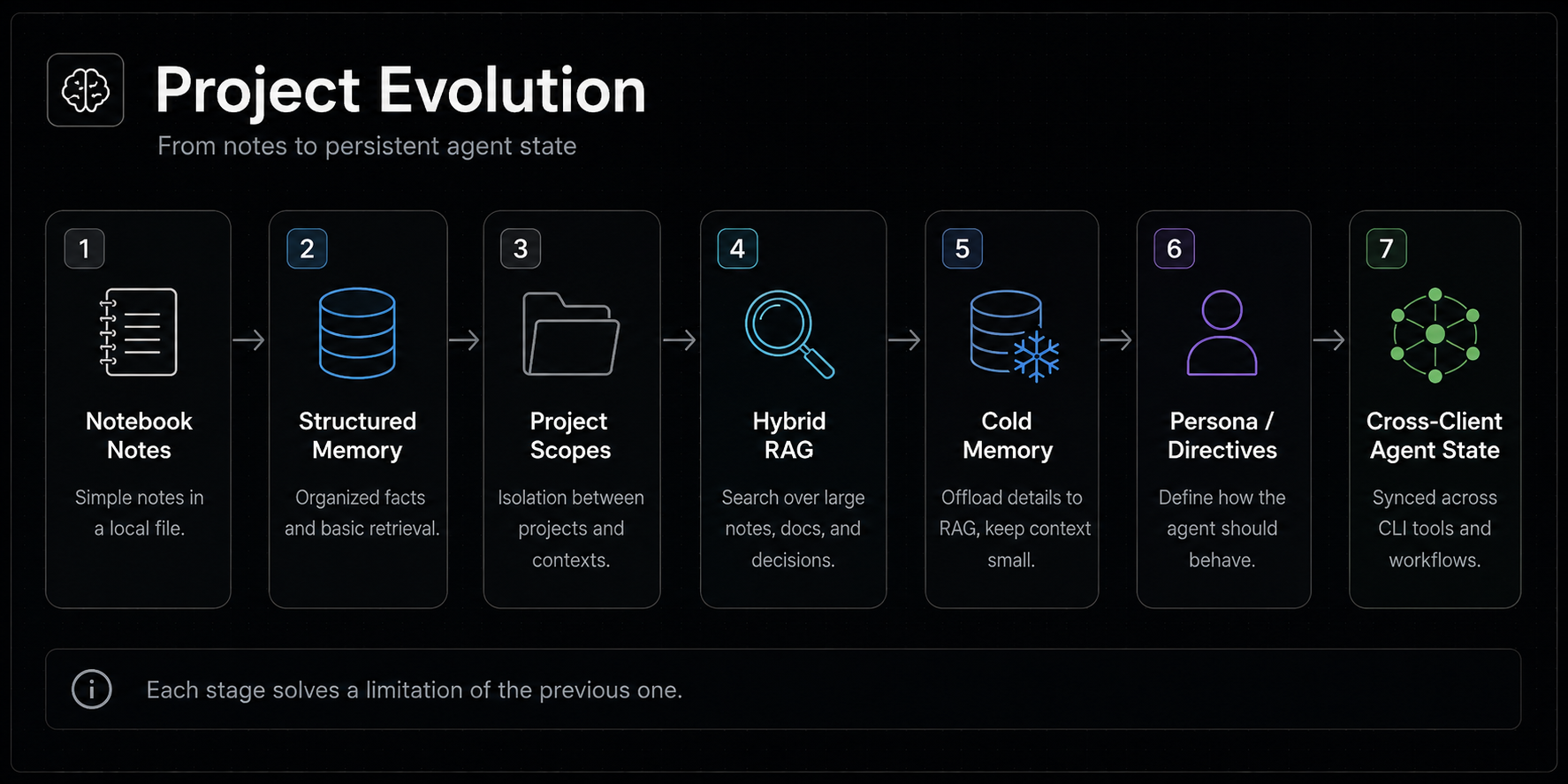
Highlights
- Human-readable Markdown Notebook facts with stable IDs, TTL, protection, tags, superseding, and explicit
fact/directivesemantics. - Agent-authored long-form RAG Memory Notes for cold or episodic context.
- Hybrid SQLite FTS5 BM25 + local ONNX vector retrieval with RSF/RRF fusion.
- Compact semantic TOC discovery through
resultMode: "index", followed by deliberate full-source expansion. - PDF, DOCX, XLSX/XLS/CSV, Markdown, text, HTML/URL, and source-code ingestion.
- Three-tier document hierarchy, retrieval-policy expansion for tables/code, and GraphRAG Lite symbol extraction.
- Git-identity project scopes that follow a repository across directories, machines, and operating systems.
- Active persona overlays shared across OpenCode, Codex, Claude Code, Gemini CLI, and Antigravity.
- Local-only, cloud-only, and bidirectional hybrid-sync modes, including portable raw RAG blobs and deletion tombstones.
- No Docker, external vector database, hosted embedding API, or telemetry.
This is a practical agent-memory system, not a claim of generalized benchmark superiority. Repository benchmark results describe the included evaluation corpus and configuration.
Quick Start
Requirements
- Node.js
22.5.0or newer; the project uses the built-innode:sqlitemodule. - npm/npx.
- OpenCode, Codex, Claude Code, Gemini CLI, Antigravity, Google Jules, or another MCP-capable client.
CPU execution with Xenova/multilingual-e5-small is the recommended stable default. WebGPU execution is experimental.
Install and Configure
Configure every supported client location:
npm install -g @lotargo/memory_plugin
memory_plugin setup
Or run setup without a permanent global installation:
npx @lotargo/memory_plugin setup
Target one client when needed:
memory_plugin setup --opencode
memory_plugin setup --codex
memory_plugin setup --claude
memory_plugin setup --antigravity
memory_plugin setup --gemini        # Gemini CLI (~/.gemini/settings.json)
Use --local with Antigravity setup to create the workspace-local .agents/mcp_config.json even when .agents/ does not yet exist.
Claude Code, Gemini CLI, and Codex setup/uninstall use their native MCP lifecycle commands when available. An ownership-checked config edit is retained as a compatibility fallback for missing, older, or non-functional client CLIs. Antigravity remains a separate integration because it uses a different config layout.
Setup also installs the bundled using-memory skill and managed memory instructions for the selected clients. Existing unrelated configuration is preserved.
Uninstall
Remove the plugin from one or all clients without deleting Notebook/RAG data:
memory_plugin uninstall --dry-run      # preview
memory_plugin uninstall                # remove all clients, keep data
memory_plugin uninstall --purge --yes  # also delete local data
memory_plugin uninstall --opencode --purge-cache
memory_plugin uninstall --opencode --claude
npx @lotargo/memory_plugin uninstall --dry-run
memory_plugin setup --uninstall --purge  # alias
What uninstall removes by default (without --purge):
~/.config/opencode/opencode.json— plugin entry, includingfile://dev links.~/.claude.json—mcpServers.memory-agent.~/.gemini/settings.json— Gemini CLImcpServers.memory-agent.~/.gemini/config/mcp_config.jsonand.agents/mcp_config.json— AntigravitymcpServers.memory-agent.~/.codex/config.toml—[mcp_servers.memory-agent]only when owned by this plugin.- Managed prompt blocks from Codex, Claude Code, Gemini CLI, and Antigravity instruction files.
- The bundled
using-memoryskill from each client's managedskills/directory.
Existing user content outside plugin-owned markers is preserved. Foreign memory-agent registrations, modified/non-owned skills, unrelated file plugins, and other packages in the @lotargo OpenCode cache namespace are left untouched.
Normal uninstall keeps OpenCode's package cache. --purge-cache removes only exact cache directories owned by this package. With --purge, the plugin also deletes MEMORY_DIR and its prompt state after resolving and validating every target, rejecting dangerous roots and broad parent paths, and displaying the targets before confirmation. The npm package itself is removed separately with npm uninstall -g @lotargo/memory_plugin.
On Linux/macOS, XDG_CONFIG_HOME and XDG_CACHE_HOME are respected. OPENCODE_CONFIG_DIR and MEMORY_DIR remain explicit overrides on every platform.
Verify Codex
Codex uses a direct executable chain (node -> mcp-server/boot.js) instead of an npx/.cmd launcher, avoiding Windows stdio handshake failures. Setup safely migrates legacy registrations in ~/.codex/config.toml.
memory_plugin doctor --codex
The doctor validates the configured Node runtime, MCP initialization, tool discovery, and real memory_info and recall(scope: "all") calls.
Headless / CI Setup
# Authenticate with a Turso account token and enable hybrid sync
memory_plugin setup --api-key <TURSO_API_TOKEN> --mode hybrid-sync

# Or change mode when credentials already exist
memory_plugin setup --mode only-cloud
Prefer TURSO_API_TOKEN, TURSO_DB_URL, and TURSO_DB_TOKEN environment variables over command-line secrets because shell arguments may appear in process lists and history.
Local Repository Development
npm install
npm run dev:link
dev:link performs an npm global link for the memory_plugin, memory-agent, and memory-cli binaries; rewrites only this plugin's OpenCode entry to an absolute file:// URL for opencode-plugin/main.js; creates opencode.json.memory-dev-backup on first use; synchronizes managed prompts; and copies the current skill to all client skill locations.
After code changes, restart OpenCode to reload the module. Codex, Claude Code, Gemini CLI, and Antigravity load prompt and skill files at session start, so open a new task/session after synchronization. Publishing to npm is not required for local testing.
Memory Architecture
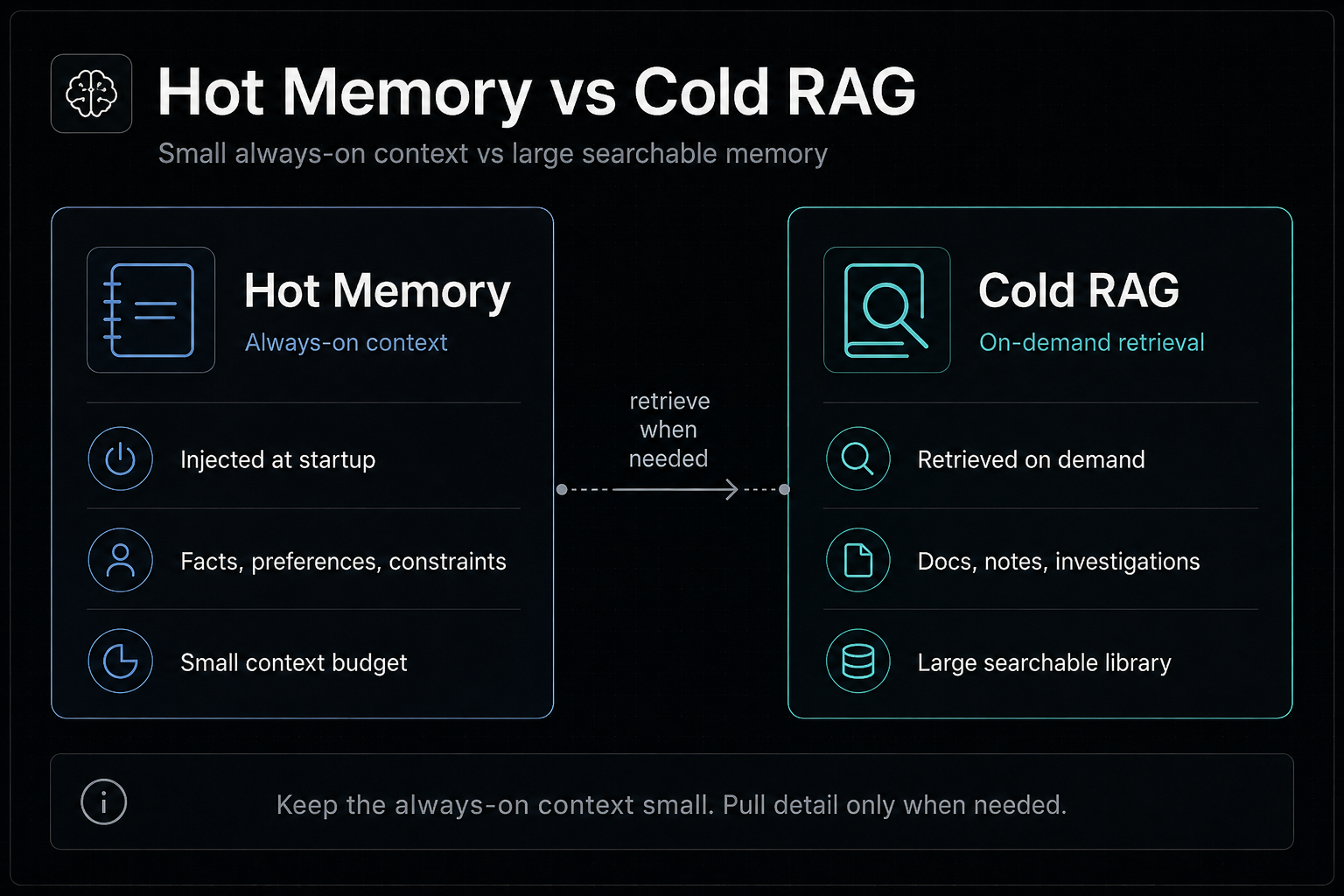
The architecture deliberately separates small, always-useful context from large, on-demand knowledge. This keeps session initialization useful without turning persistent memory into an ever-growing prompt.
1. Hot Notebook Memory
Notebook memory stores concise, high-signal context in Markdown:
- [2026-08-22 10:00] **API Convention** — Use Fastify and Zod for new services <!-- id:a1b2c3, keep:1, tags:arch, kind:fact -->
Supported metadata includes:
id: stable short identifier used byget_fact,update_fact, andforget.kind:factfor descriptive context ordirectivefor active personalization/working instructions.ttl:90d,2w,24h,12m, or a bare day count. Expired entries are retained and marked[EXPIRED].keep: protects an entry from ordinary deletion.tags: recall filters and legacy classification metadata.supersedes/supersededBy: preserves version history while excluding obsolete facts from active recall.
recall(scope: "all") returns global facts plus only the current Git-linked project's facts. Full bodies are the default and should be used for session initialization; mode: "headers" is only for compact inventories.
2. Cold RAG Memory Notes
Use remember_note when the reusable value is in the detailed record itself:
remember_note(
  title: "Authentication Investigation",
  content: "Detailed symptoms, experiments, rejected explanations, and final cause...",
  kind: "research",
  tags: "auth,incident",
  scope: "project"
)
Supported note kinds are decision, research, context, handoff, and note. Notes are represented as virtual RAG documents with stable docId and content-addressed blobHash. They are searchable with the same engine as external sources but are not injected into every session.
Recommended discovery flow:
query_knowledge_base(query: "authentication token decryption investigation", resultMode: "index")
    -> inspect compact candidates and stable doc_id values
manage_knowledge_base(action: "read_document", docId: "selected-id")
    -> expand the complete raw note only when needed
Use resultMode: "snippet" when retrieved passages are immediately useful. Use resultMode: "index" when first identifying the correct source; index mode intentionally omits bodies and disables large policy expansion.
3. Curated External Knowledge
ingest_document accepts:
- Raw text or Markdown (
type: "text"). - Local files (
type: "file"), including PDF, DOCX, XLSX, XLS, CSV, text, Markdown, and source code. - Web pages (
type: "url"), which are fetched and normalized instead of indexing the URL string.
RAG is a curated library, not an automatic archive. Ingest reliable sources likely to matter again, particularly current documentation or project specifications. Project scope is the default; use global scope only for intentionally reusable cross-project knowledge.
Hot + Cold Linking
When a decision needs both quick orientation and detailed history:
- Save the concise conclusion with
remember. - Save the rationale or investigation with
remember_note. - Connect them with
link_knowledge, using the note's returneddocId.
This keeps startup context small while preserving the complete reasoning trail without duplicating the note body into Notebook memory.
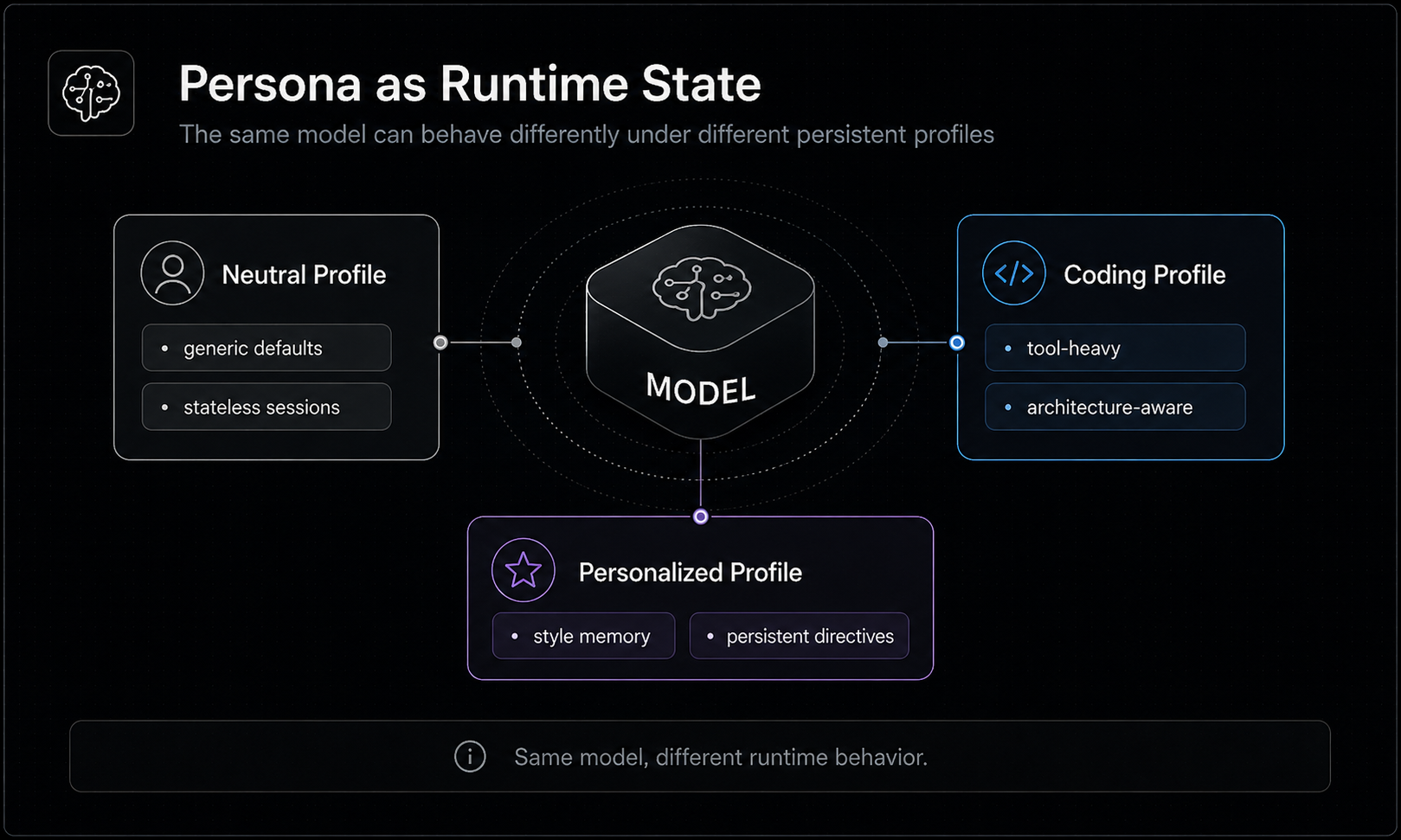
Persona and Agent Personalization
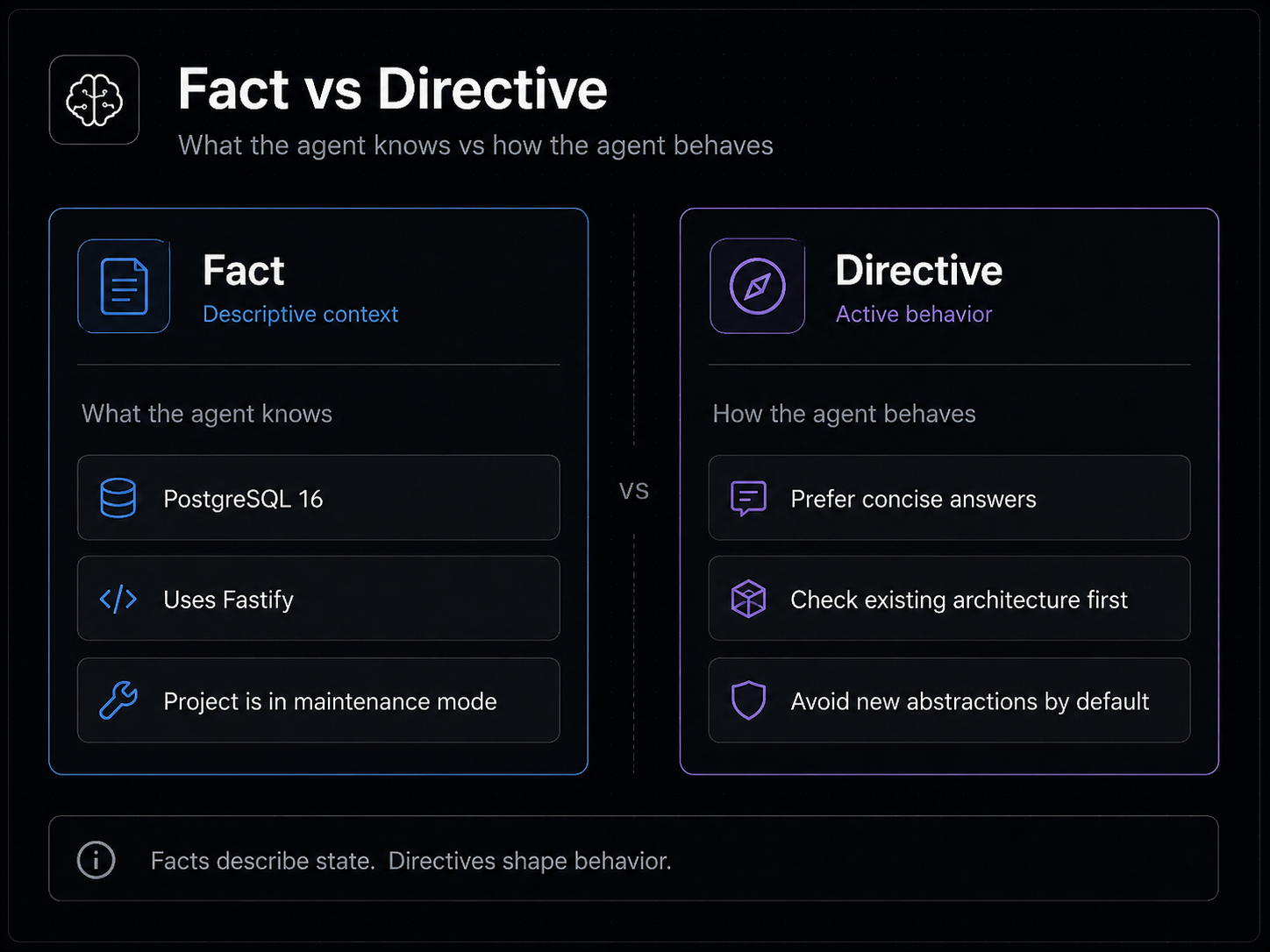
Notebook entries have explicit semantics:
kind: "fact"       # descriptive context — what the agent knows
kind: "directive"  # active configuration — how the agent should behave
Use kind: "directive" for personality, behavior, tone, communication style, preferences, or working conventions the agent should actively apply. Explicit kind is authoritative; persuasive wording alone does not turn a fact into an instruction.
OpenCode
The native plugin performs complete session initialization automatically:
- Global and current-project descriptive entries are injected into
<MEMORY_FACTS>. - Active global directives are separated into
<PERSONAL_AGENT_OVERLAY>. - Directives are promoted through OpenCode's system-prompt transform.
- Agents are instructed not to perform a redundant startup
recall; manual or filtered recall remains available.
Codex, Claude Code, Gemini CLI, and Antigravity
These clients receive plugin-owned instruction and persona blocks in:
~/.codex/AGENTS.md~/.claude/CLAUDE.md~/.gemini/GEMINI.md~/.gemini/config/AGENTS.md
The global Notebook is the source of truth. Managed prompt blocks are generated views and update automatically after global directive changes, relevant cloud pulls, setup, or dev:link.
Manual synchronization:
memory-cli sync-persona
npm run persona:sync             # from the repository
Legacy entries using persona, behavior, speech, style, tone, preference(s), instruction(s), directive, or inject:1 metadata remain compatible. Permanently classify them as explicit directives with the idempotent migration:
memory-cli migrate-persona --dry-run
memory-cli migrate-persona
npm run persona:migrate          # from the repository
Higher-priority platform and safety instructions remain authoritative.
Project Identity and Scope Isolation
Project memory is Git-first:
- Repositories with a remote use
git:<normalized-host-and-path>, for examplegit:github.com/owner/repo. - Repositories without a remote use
git:local:<repository-name>. - Every subdirectory of the same repository resolves to the same identity.
- Outside Git, project memory is not created; global memory remains available.
The SQLite identity registry stores remote, path, and basename aliases. It supports moving a repository between directories or operating systems without changing its logical memory identity.
| Tool | Purpose |
|---|---|
link_project_memory |
Register the current Git identity and merge compatible legacy path/basename facts and RAG scope data. |
unlink_project_memory |
Remove a path alias; optionally purge the identity record. |
relink_project_memory |
Move/merge facts and RAG scope data to a new normalized remote identity. |
For both Notebook and RAG retrieval, all means global + current project, never all known projects. Unrelated project memories and documents are isolated.
Retrieval and Knowledge Graph
Hybrid Retrieval
The local retrieval pipeline combines:
- SQLite FTS5 BM25 lexical search.
- Local ONNX dense embeddings (
Xenova/multilingual-e5-smallby default). - RSF (default), RRF, semantic-only, or lexical-only ranking.
- Optional cross-encoder reranking.
- Batched query embeddings through
batch_query_knowledge_base. - Optional fixed vector dimensions and an experimental WebGPU execution mode.
Queries should be short, concept-dense phrases. For multi-part research or comparisons, use batch_query_knowledge_base; all query embeddings are computed in one ONNX pass.
Three-Tier Chunking and Policy Expansion
Each document is partitioned into three retrieval levels: section-level big chunks, medium blocks, and micro chunks. Tables receive compact summaries and code blocks receive signature chunks. With policyExpansion: true (default), matching summaries/signatures expand to their full source blocks for content-rich retrieval. Set the configuration to false when pure micro-chunk precision is preferred.
Re-ingesting an updated path/URL preserves its stable document ID and knowledge links while rebuilding chunks, vectors, policies, and structural edges. Ingesting the same source in another scope adds a scope association without duplicating the document.
GraphRAG Lite
The SQLite graph layer requires no external graph database or ingestion-time LLM:
| Relation | Meaning |
|---|---|
CONTAINS |
Document -> Section -> Micro Chunk graph hierarchy |
DEFINES_SYMBOL |
A document section defines an extracted code symbol |
LINKS_TO and custom relations |
A Notebook fact points to a document, note, section, or line range |
Code-symbol extraction covers JavaScript/TypeScript, Python, Go, Rust, C++, Java/Kotlin, C#, PHP, and Ruby patterns.
Cloud Synchronization
Cloud support uses Turso / LibSQL and is optional.
| Mode | Behavior |
|---|---|
only-local (default) |
Markdown notebooks, SQLite index, CAS blobs, and models remain local. |
only-cloud |
Notebook and database operations use Turso directly; raw RAG blobs are materialized into a verified local cache when read. |
hybrid-sync |
Local-first reads/writes with background push, reverse synchronization, and conflict resolution. |
Hybrid synchronization covers Notebook stores and complete RAG state: documents, scopes, sections, chunks, vectors, retrieval policies, graph edges, fact links, compressed raw CAS blobs, and deletion tombstones. Raw notes/documents can therefore be expanded on another device rather than returning metadata without source content.
Notebook conflict strategies:
merge(default): union fact lines with local order first and deduplication.cloud-wins.local-wins.
Cloud operations retry with timeouts and can switch to failoverUrl after repeated primary failures. In hybrid-sync, local SQLite continues serving reads during an outage. In only-cloud, an unavailable primary with no failover surfaces as an error.
Authentication
memory-cli login
memory-cli login --api-token          # hidden prompt if value omitted
memory-cli login --from-env
memory-cli login --db-url <URL>       # token from prompt or TURSO_DB_TOKEN
memory-cli auth-status
memory-cli logout
Stored tokens live in auth_secrets.enc, not config.json. They are encrypted with AES-256-GCM using PBKDF2-HMAC-SHA256 (600,000 iterations) over a stable machine fingerprint and written with owner-only permissions where supported.
This is not an OS keychain. It protects against casual inspection/file-only exfiltration, not a compromised local user account. Encrypted secrets are machine-bound. The headless .env fallback stores credentials in plaintext by design.
Tool Reference
The MCP server exposes 16 tools. The native OpenCode plugin exposes the same 16 plus two OpenCode-specific helpers, for 18 total.
Notebook and Cold Memory
| Tool | Important parameters | Purpose |
|---|---|---|
remember |
fact, title, kind, scope, directory, ttl, keep, tags, supersedes, optional link fields |
Save a concise hot fact or directive. |
recall |
scope, directory, query, tags, since, until, mode, offset, limit, includeSuperseded |
Load/filter Notebook facts and linked-document references. |
get_fact |
id, scope, directory |
Read one fact and all metadata by stable ID. |
update_fact |
id, newText, title, kind, scope, directory |
Update/reclassify a fact while preserving date, metadata, and links. |
forget |
query, scope, directory, force |
Delete by index, range, ID, or text; force overrides [KEEP]. |
memory_info |
directory |
Show version, storage paths/counts, Git identity/registry state, and RAG statistics. |
remember_note |
title, content, kind, tags, scope, directory, generateEmbeddings |
Save a detailed cold/episodic note into RAG. |
Identity and Knowledge Graph
| Tool | Important parameters | Purpose |
|---|---|---|
link_project_memory |
directory, remote |
Register Git identity and migrate compatible legacy data. |
unlink_project_memory |
directory, purge |
Remove an alias or purge its registry identity. |
relink_project_memory |
directory, remote |
Move/merge memory into a new normalized remote identity. |
link_knowledge |
action, factText, docId, scope, startLine, endLine, relationType |
Link facts to documents/notes or inspect graph links. |
RAG Knowledge Base
| Tool | Important parameters | Purpose |
|---|---|---|
ingest_document |
content, type, title, path, scope, directory, generateEmbeddings |
Ingest raw text, a local file, or a URL. |
query_knowledge_base |
query, scope, limit, instruction, resultMode, generateEmbeddings, directory |
Run one hybrid query in snippet or compact index mode. |
batch_query_knowledge_base |
queries, scope, limit, instruction, resultMode, generateEmbeddings, directory |
Run several queries with one embedding batch. |
manage_knowledge_base |
action, scope, docId, snapshotPath, directory |
Stats, list, full raw read, scoped delete/unlink, snapshot export/import. |
reindex_knowledge_base |
model, dimension |
Rebuild vectors after changing model/dimension while preserving source and graph data. |
OpenCode-Only Helpers
| Tool | Purpose |
|---|---|
list-mcp-tools |
Show connected MCP servers and their intended roles. |
mcp-reminder |
Suggest a connected MCP/tool family for a described task. |
CLI Reference
memory_plugin and memory-agent are MCP stdio entry points. memory_plugin setup performs client installation, while memory_plugin cli or memory-cli opens the interactive control panel. Direct administration commands should use memory-cli.
| Command | Purpose |
|---|---|
memory_plugin setup [client flags] [--mode <mode>] |
Configure clients, skills, prompts, and optional cloud mode/auth. |
memory_plugin doctor --codex |
Validate Codex configuration and live MCP behavior. |
memory-cli |
Open the interactive TUI. |
memory-cli login ... / logout / auth-status |
Manage Turso authentication. |
memory-cli link --dir <path> [--remote <url>] |
Link a Git project identity. |
memory-cli unlink --dir <path> [--purge] |
Remove an alias or registry identity. |
memory-cli relink --dir <path> --remote <url> |
Move/merge into a new remote identity. |
memory-cli identity --dir <path> |
Inspect resolved Git identity. |
memory-cli migrate_titles [--key <key>] |
Add titles to legacy Notebook entries. |
memory-cli enable-prompt / disable-prompt |
Add/remove only plugin-owned memory instruction blocks. |
memory-cli sync-persona |
Regenerate managed persona blocks from global directives. |
memory-cli migrate-persona [--dry-run] |
Convert legacy persona metadata to explicit kind:directive. |
memory-cli dev-link |
Link the installed binaries/OpenCode plugin to the working repository. |
memory-cli uninstall [--purge] [--purge-cache] [--dry-run] [--yes] [client flags] |
Remove plugin, MCP entries, prompts and skills; --purge deletes local data, while --purge-cache explicitly removes only this plugin's OpenCode cache. |
The TUI provides retrieval configuration, model management, Notebook/RAG browsing, reindexing, snapshots, cloud settings, prompt integration, diagnostics, and reset actions. Use Up/Down, Enter, and Backspace to navigate.
Client Integration
| Client | Integration | Session initialization | Tool count |
|---|---|---|---|
| OpenCode | Native plugin in ~/.config/opencode/opencode.json |
Full memory auto-injection + system persona transform | 18 |
| Codex | MCP server in ~/.codex/config.toml |
Managed prompt requires full recall(scope: "all") |
16 |
| Claude Code | MCP server in ~/.claude.json |
Managed prompt requires full recall(scope: "all") |
16 |
| Gemini CLI | MCP server in ~/.gemini/settings.json |
Managed ~/.gemini/GEMINI.md prompt requires full recall(scope: "all") |
16 |
| Antigravity | MCP server in ~/.gemini/config/mcp_config.json and optional .agents/mcp_config.json |
Managed prompt requires full recall(scope: "all") |
16 |
| Google Jules / generic MCP | MCP stdio server | Client instructions should initialize with full recall | 16 |
The bundled using-memory skill teaches agents to:
- Avoid duplicate recall when OpenCode already auto-injected memory.
- Perform full unfiltered recall first in clients without auto-injection.
- Apply
kind:directiveentries as active configuration. - Register unlinked Git identities with
link_project_memory. - Route concise facts, long internal notes, and external sources to the correct store.
- Use semantic index discovery before expanding a full note/document.
- Save high-signal knowledge proactively and avoid transient noise.
Configuration
Configuration is stored in <memory-dir>/config.json.
| Key | Default | Meaning |
|---|---|---|
mode |
only-local |
only-local, only-cloud, or hybrid-sync |
conflictStrategy |
merge |
Notebook conflict policy: merge, cloud-wins, local-wins |
fusionAlgorithm |
rsf |
rsf, rrf, semantic_only, or lexical_only |
alpha |
0.5 |
Dense-vector weight for RSF |
embeddingModel |
Xenova/multilingual-e5-small |
Local Hugging Face/ONNX embedding model |
vectorDimension |
0 |
Fixed vector size; 0 auto-detects model output |
vectorScanLimit |
50000 |
Maximum vector candidates; 0 is unlimited |
rerankerModel |
none |
Optional cross-encoder model |
rerankerEnabled |
false |
Enable cross-encoder reranking |
batchSize |
12 |
Ingestion embedding batch size |
policyExpansion |
true |
Expand matched table summaries/code signatures |
executionDevice |
cpu |
cpu or experimental webgpu |
gpuAttentionBudget |
2000000 |
Experimental GPU micro-batch budget |
onnxThreads |
0 |
WASM thread count; 0 auto-detects |
tursoUrl |
"" |
Primary LibSQL endpoint populated by login |
failoverUrl |
"" |
Optional secondary cloud endpoint |
authorized |
false |
Whether cloud authorization completed |
username |
"" |
Authenticated Turso username |
ingestAllowedPaths |
[] |
Additional directories allowed for local-file ingestion |
ingestAllowAnyPath |
false |
Unsafe escape hatch allowing arbitrary file reads |
ingest_document(type: "file") is restricted to the current working directory, the plugin data directory, and explicitly allowed paths. This prevents a prompt-injected agent from silently indexing unrelated secrets such as SSH keys or .env files.
Storage, Privacy, and Security
The data-directory resolution order is:
MEMORY_DIR.$OPENCODE_CONFIG_DIR/memory.- Existing legacy
~/.config/opencode/memory. %LOCALAPPDATA%/opencode/memoryon Windows.$XDG_CONFIG_HOME/opencode/memoryor~/.config/opencode/memoryelsewhere.
Important paths inside it:
global.md                         global Notebook facts/directives
git_<identity>.md                 per-project Notebook facts
config.json                       non-secret configuration
auth_secrets.enc                  encrypted cloud credentials
storage/memory.sqlite             RAG, graph, identity registry, sync state
storage/blobs/                    content-addressed compressed raw sources
storage/models/                   cached ONNX models
exports/                          snapshots/exports
- No telemetry or analytics are sent.
- Model weights download from Hugging Face on first use and remain cached afterward.
- Network access is otherwise limited to explicit URL ingestion and configured Turso cloud modes.
- Snapshot path validation and local ingestion allowlists restrict arbitrary filesystem access.
- SQLite uses foreign keys, migrations, transactions, and a busy timeout for concurrent access.
Dependency Advisories
Spreadsheet ingestion uses SheetJS CE 0.20.3 from the official SheetJS CDN rather than the stale xlsx@0.18.5 package in the public npm registry. This version is outside the affected ranges for the known prototype pollution and ReDoS advisories.
npm audit may still report the high-severity sharp / libvips advisory inherited through @huggingface/transformers. The project uses Transformers only for text feature extraction and explicitly sets env.sharp = false; it does not pass images through the Transformers image-decoding path. The upstream dependency currently constrains sharp below the patched 0.35.x line, so this warning remains transitive until Transformers updates its dependency. Advisory: GHSA-f88m-g3jw-g9cj.
Repository Testing and Benchmarks
These commands are intended for a source checkout of the repository. Test suites and benchmark harnesses are intentionally excluded from the published npm tarball.
npm test                   # unified unit, integration, and simulated-cloud suites
npm run smoke              # real ONNX vectors and end-to-end memory journey
npm run test:rag           # retrieval quality evaluation
npm run benchmark          # full search benchmark report
npm run benchmark:table-code
The fast suites use generateEmbeddings: false in retrieval paths for deterministic offline coverage. npm run smoke covers the dense-vector path with real cached/downloaded model weights and checks multilingual semantic retrieval. Both modes are needed: lexical-only tests cannot catch a broken vector serialization or ONNX execution path.
The unified suites cover fact formatting, typed directives, persona migration/synchronization, client prompt safety, Codex launcher compatibility, Git identity isolation, RAG scopes, policy expansion, RAG Memory Notes, semantic index output, raw blob portability, reverse sync, tombstones, snapshots, MCP contracts, spreadsheet parsing, and cloud authentication workflows.
See docs/BENCHMARKS.md for methodology and detailed reports.
Included Search Evaluation
The stored 32-document / 21-query technical corpus produced:
| Strategy | MRR@5 | Recall@5 | NDCG@5 |
|---|---|---|---|
| BM25 lexical only | 0.6706 | 76.19% | 0.6934 |
| Dense ONNX only | 0.8135 | 100.00% | 0.8612 |
Hybrid RRF (k=60) |
0.8810 | 95.24% | 0.8997 |
Hybrid RSF (alpha=0.5) |
0.9286 | 100.00% | 0.9473 |
Troubleshooting
No such built-in module: node:sqlite: install Node.js22.5.0or newer.- Codex tools are missing: run
memory_plugin setup --codex, thenmemory_plugin doctor --codex, and open a new Codex task. - OpenCode still runs old code: restart OpenCode. For repository development, confirm
npm run dev:linkpoints its plugin entry toopencode-plugin/main.js. - Persona changes are not visible: run
memory-cli sync-persona, then start a new CLI session/task. Usememory-cli migrate-persona --dry-runfor legacy entries. - Project recall is empty: call
memory_info; if a Git identity isRegistry: unlinked, runlink_project_memoryormemory-cli link --dir <repo>. - A raw note/document exists only in cloud:
manage_knowledge_base(action: "read_document")automatically materializes and verifies its CAS blob locally when cloud credentials are available. - Embedding model changed: run
reindex_knowledge_baseor use the TUI[REINDEX]action.