Postgres Analytics MCP Server
A Model Context Protocol (MCP) server that lets AI assistants (Claude, Cursor, and other MCP-compatible clients) safely inspect and query a PostgreSQL database - with read-only enforcement, row/timeout limits, and full audit logging.
Built to answer a simple question: how do you let an AI agent touch a real database without giving it the ability to break anything?
What it does
Once connected, an AI client can ask things like:
- "What tables are in my database?"
- "Show me the 10 most recent orders."
- "Why is this query slow?"
- "Which tables are missing indexes?"
The server exposes 5 tools over MCP:
| Tool | Purpose |
|---|---|
| list_schemas | List all non-system schemas |
| list_tables | List tables in a given schema |
| run_query | Execute a read-only SQL query (SELECT/WITH only) |
| explain_query | Return a query execution plan and flag if it is slow |
| get_table_stats | Return row estimates and index/seq scan counts for a table |
Why this exists
Companies are increasingly connecting AI agents to internal systems (databases, Kubernetes, APIs), and the hard part is doing that safely. This project is a small, concrete example of that: a guarded bridge between an AI client and a production-style database.
Design decisions
Read-only by default, twice over: every query is validated against a blocklist and must start with SELECT, WITH, or EXPLAIN. The database connection itself is also opened in read-only mode as a second line of defense.
Row limits and query timeouts: every query is capped at a configurable row limit and statement timeout so it cannot return unbounded data or hang the server.
Auth lives in the process environment, not in chat: the API key is set via the MCP client config as an environment variable, so the AI model never sees or handles it directly.
Audit logging: every tool call is recorded with a timestamp, tool name, arguments, and outcome.
Setup
Requirements: Python 3.11+, PostgreSQL
Create a virtual environment and install dependencies: python -m venv venv venv\Scripts\Activate.ps1 pip install -r requirements.txt
Create a database and load the sample schema: psql -U postgres -c "CREATE DATABASE sampledb;" psql -U postgres -d sampledb -f seed.sql
Copy .env.example to .env and fill in your own values.
Run it directly to sanity check: python -m server.main
Connecting to Claude Desktop
Add to claude_desktop_config.json (Claude Desktop -> Settings -> Developer -> Edit Config):
"mcpServers": {
  "postgres-analytics": {
    "command": "C:\\path\\to\\venv\\Scripts\\python.exe",
    "args": ["-m", "server.main"],
    "env": {
      "PYTHONPATH": "C:\\path\\to\\project",
      "MCP_API_KEY": "same-value-as-in-.env"
    }
  }
}
Example
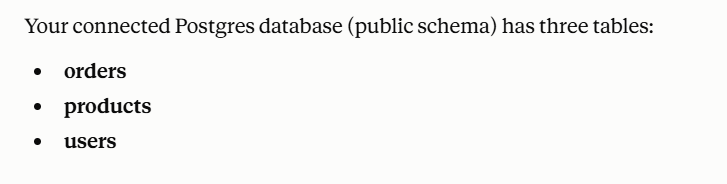
Asking Claude "What tables are in my connected Postgres database?" after connecting:
Following up on table stats surfaced a real finding - the orders table had zero index scans despite 2,000 rows, meaning every lookup was a full sequential scan:
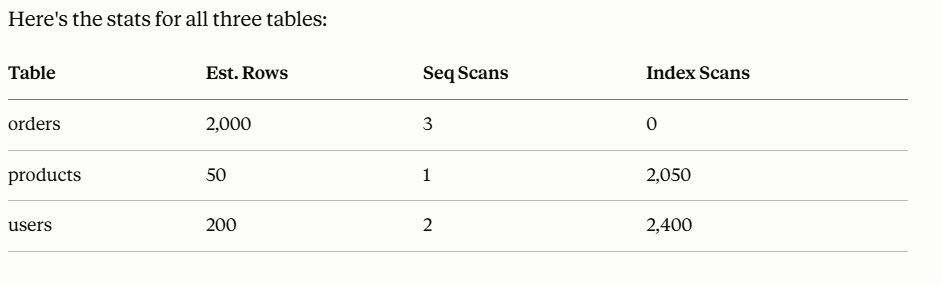
This is the server doing what it's meant to do: giving an AI client safe, structured access to a real database, and letting the model reason over the result rather than just dumping raw output.
Stack
Python, PostgreSQL, MCP Python SDK, psycopg2