Tapp








Tapp lets coding agents verify UI changes on real iOS, Android, and web surfaces, then turns reviewed proof into deterministic CI checks. It can inspect and drive screens, explore for technical failures, and save important journeys as replayable tests.
Exploration reports findings, coverage, evidence, and limits. Only the repository-connected gate
returns pass, fail, or inconclusive. Tapp does not turn an autonomous crawl into a subjective
"ship-ready" score.
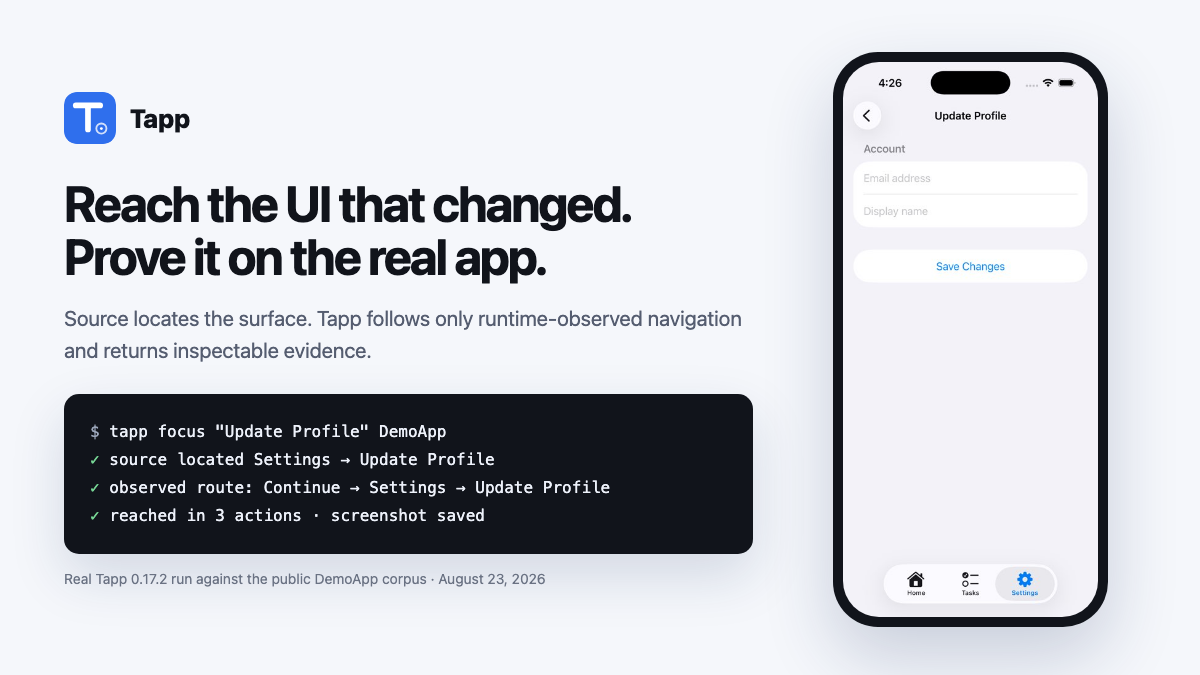
Real evidence, not a mock: this public DemoApp run reached the requested iOS surface in three observed route actions. Watch 45 seconds of autonomous exploration or inspect a complete sanitized web evidence report.
Supported targets:
| Target app | Runtime |
|---|---|
| iOS | Simulator on macOS with Xcode; driven through XCUITest and accessibility |
| Android | Connected emulator or device with adb; driven through UIAutomator |
| Web | Owned browser app in Playwright Chromium |
| Windows desktop | WPF, WinForms, and WinUI apps through Windows UI Automation — early runs are set up through the pilot |
Windows hosts Android and web testing when their prerequisites are installed, and is the home of the Windows desktop target.
Give Tapp to your coding agent
After setup, the whole user prompt is:
Use Tapp to test this app.
The official skill teaches the agent to choose the smallest useful operation, handle repositories with multiple app targets, inspect visual evidence, and keep exploration observations separate from gate decisions.
Claude Code, Codex, Cursor, Copilot, and other Agent Skills clients (recommended):
npx -y skills add aarwitz/tapp --skill tapp
This installs the open Agent Skills workflow into the current project and lets the agent run the npm
CLI directly. Inspecting, focused evidence, autonomous exploration, deterministic replay, and gating
need no MCP server, plugin, account, API key, global Tapp install, or pasted prompt block. Add -g
for a user-wide install, or --agent claude-code, --agent codex, and similar selectors to constrain
the clients. Start or restart the agent from the application repository and use the short prompt
above.
Claude Code — optional enhanced skill and MCP tools:
claude plugin marketplace add aarwitz/tapp
claude plugin install tapp@tapp
The plugin bundles the same tapp Agent Skill with the matching npm-backed MCP server. Add it when
you want inline screenshot results or when the agent must interactively tap, type, and record an
arbitrary multi-step journey in one persistent session. It is not required for the core
skill-to-CLI workflow.
A live site, production, or a site you do not own: the agent uses tapp explore --read-only / tapp_explore {readOnly:true},
which renders and reads the page but never clicks, types or submits. Exploration is for apps and
environments you own.
No agent integration: run the npm package directly from an app repository in one line:
npx -y @aarwitz/tapp@latest init . --explore
VS Code: install Tapp from the Marketplace. It contributes the same cross-platform Agent Skill to Copilot plus focused iOS simulator tools and an auto-refreshing screenshot preview. The preview is not an embedded Simulator or video stream. Android and web remain available through the skill's CLI/MCP workflow.
Teams: Tapp's core stays MIT licensed. A small paid founding pilot is open for hands-on repository onboarding, important-journey setup, and CI integration in infrastructure you control. Apply without sharing private data.
you:    "Add a logout button to the settings screen"
agent:  *writes the Swift*
agent:  *tapp: finds Settings in source, follows its previously observed route, screenshots it*
agent:  "Done — and here it is working on the simulator: [screenshot]"
npm CLI quickstart
Requirements: Node ≥ 18. iOS needs macOS + Xcode; Android needs adb plus a connected
emulator/device (and JDK 17 when Tapp builds source rather than installing an existing APK); web
needs Playwright + Chromium. tapp doctor reports these separately.
From the app repository, ground Tapp once, then use the smallest operation for later checks:
npx -y @aarwitz/tapp@latest init . --explore # first run: detect/build, explore, and ground .tapp/ui-map.json
npx -y @aarwitz/tapp@latest look            # one current screen + screenshot
npx -y @aarwitz/tapp@latest explore --goal "Save storefront settings visible above keyboard" # source + observed-route fast path
npx -y @aarwitz/tapp@latest explore         # later broad exploration (observation, not a gate)
Source tells explore --goal where the requested UI likely lives; only a route already observed in
.tapp/ui-map.json authorizes navigation. If a fresh repository has no such route yet, Tapp returns
the source evidence instead of guessing through the app.
Claude Code can read the saved image with its file-reading tool; Codex can open it with
view_image. The agent should report what the screenshot proves, relay the exploration findings
as-is (an observation, not a merge decision — tapp ci gates that), and link the HTML evidence
report. No Tapp server, account, global install, API key, or bundle id is required for this loop.
The platform runtime still needs to be installed, and repository onboarding can write reviewed
configuration under .tapp/.
The product, executable, and package leaf are all Tapp: npm distributes it as
@aarwitz/tapp, while the installed command remains tapp.
To bootstrap maintained release infrastructure, preview the repository model and grounded plan before Tapp writes anything:
npx -y @aarwitz/tapp@latest init . --dry-run --json-out /tmp/tapp-init.json
# Build/start the detected web target, ground the first UI Map, then stop it.
npx -y @aarwitz/tapp@latest init . --explore --platform web
# Or build/install the detected Xcode target, ground the map, and persist the validated scheme.
npx -y @aarwitz/tapp@latest init . --explore --platform ios --target .
# Or connect to an already-running owned URL:
npx -y @aarwitz/tapp@latest init . --explore --platform web --url http://127.0.0.1:4173
# If the app has roles/accounts, bind names once; values stay in local/CI secrets.
npx -y @aarwitz/tapp@latest plan actor set alice . --role member --session isolated \
  --credential email=ALICE_EMAIL --credential password=ALICE_PASSWORD
# Review-only path: tapp init . → tapp plan show → tapp plan review --approve ...

# After approved drafts replay and are promoted, establish the selected target's baseline
# through the ordinary full gate, then generate the reviewable GitHub workflow.
npx -y @aarwitz/tapp@latest ci baseline . --platform web
npx -y @aarwitz/tapp@latest ci install .
Actor setup refuses to overwrite an existing actor. Repeat actor set with --replace only when
you intend to replace that actor's reviewed role, session, provisioning, or credential bindings.
In a repository containing multiple apps (for example, iOS plus web),
tapp init . --explore without an explicit target does not guess from detection order—even when a
prior choice is recorded. A human terminal gets a numbered
selector; a non-interactive CLI prints exact target-selection commands, while MCP also returns
structured choices. Neither builds or writes before the choice. After you choose one, the model
retains every detected target and records the choice as the default for the next bare tapp explore;
explicit init --explore continues to ask because it is the onboarding/refresh operation. Setup gaps
belonging only to unselected targets are shown as informational, not as failures of the selected run.
The baseline command writes only after exploration and every selected deterministic suite pass
conclusively. It stores .tapp/baselines/<platform>/<target-id>.json; the generated workflow
uses that exact target identity so two apps on the same platform never share a baseline. ci install writes .github/workflows/tapp.yml plus .tapp/ci.json, refuses unresolved build
configuration and existing-file collisions, and never commits, pushes, enables branch protection,
or creates GitHub resources. Review and pin the generated Tapp release reference to its immutable
commit SHA before production.
look and explore accept a repo directory, a path/to/App.app, a bundle id, or no target
(auto-detecting the repository or installed app):
npx -y @aarwitz/tapp@latest look [target]         # launch the app → screen summary + screenshot file
npx -y @aarwitz/tapp@latest look [target] --tree  # + the accessibility tree of the current screen
npx -y @aarwitz/tapp@latest look                  # no target on iOS: the booted simulator as it is right now
On iOS, look --tree inspects an installed app and never builds, uninstalls, or replaces it. With no
target, it uses the repository's recorded iOS target or the sole installed app. If the choice
is ambiguous, it lists the installed apps for you to select. Pass a bundle id to inspect a
specific sandbox build; run tapp_build (MCP) or init . --explore when you intend to replace it.
iOS Flow evidence includes flow-final.png on passing and failing replays, plus
flow-failure-N.png at a failed step, alongside the log, JSON report, and XCTest result bundle.
Web: npx -y @aarwitz/tapp@latest explore http://localhost:3000 (one-time setup:
npm i -g playwright && npx playwright install chromium). Add --watch to open Tapp's controlled,
isolated Chromium window and follow its clicks with an on-page pointer/action label. Tapp hides that
watch UI from saved evidence screenshots and does not automate your personal/default browser profile.
Focused web inspection waits briefly for loading states to settle. If a consent or location modal blocks the screen, dismiss it and wait for the content you care about in the same package-only call:
npx -y @aarwitz/tapp@latest look https://example.com --tap "Not now" --wait-for "Dashboard"
npx -y @aarwitz/tapp@latest look https://example.com --tree --tap "Not now" --wait-for "Dashboard" --json
Android:
npx -y @aarwitz/tapp@latest explore path/to/app-debug.apk --platform android --app-id com.acme.app
npx -y @aarwitz/tapp@latest look com.acme.app --platform android
Turn a driven journey into a deterministic test, or print the complete Flow format before writing one by hand:
npx -y @aarwitz/tapp@latest validate --example           # a complete starter Flow, with the step vocabulary
npx -y @aarwitz/tapp@latest validate .tapp/flows/smoke.yml
npx -y @aarwitz/tapp@latest run .tapp/flows/smoke.yml     # Flows, Tasks, contracts, and Scenarios all replay with `run`
Flows support an atomic login step using $TEST_EMAIL / $TEST_PASSWORD; Tapp's session recorder
creates that step without writing credential values into the repository.
Optional but recommended (prebuilds the test harness so the first run is fast):
npx -y @aarwitz/tapp@latest doctor --install   # ~2 min, one time
npx -y @aarwitz/tapp@latest doctor             # verify Xcode / simulators / toolchain
MCP hookup (optional)
The MCP server adds the two things a CLI can't do: screenshots inline in your agent's context (the model literally sees the screen) and the interactive session loop (tap → read tree → type, with the app staying open between actions).
Claude Code:
claude mcp add tapp -- npx -y @aarwitz/tapp@latest mcp
Cursor / VS Code (Copilot) — add to ~/.cursor/mcp.json (Cursor) or .vscode/mcp.json (VS Code):
{
  "servers": {
    "tapp": { "type": "stdio", "command": "npx", "args": ["-y", "@aarwitz/tapp@latest", "mcp"] }
  }
}
Codex CLI — add to ~/.codex/config.toml:
[mcp_servers.tapp]
command = "npx"
args = ["-y", "@aarwitz/tapp@latest", "mcp"]
Any other MCP client: stdio command npx -y @aarwitz/tapp@latest mcp.
Then ask your agent:
"Explore my app and show me what breaks." "Open com.mycompany.app on the simulator and screenshot the home screen." "Log in with test@example.com, drive to checkout, and record it as a replayable test."
What the agent gets
| Tool | What it does | |
|---|---|---|
| 👁 | tapp_look |
See a screen — the current real surface: screen summary + inline screenshot; tree:true adds the accessibility tree (ids, labels, hittability). Seconds. |
| 🕹 | tapp_session |
Interactive driving — action:"start", then tap/type/swipe/back/wait/login (each returns the fresh tree), then "end". save_flow keeps the journey as a replayable Flow; draft_flow proposes one from a goal. |
| 🔭 | tapp_explore |
Autonomous exploration — explores with no authored test, returns an observation {kind, headline, inconclusive, findingCounts, findings[]} (no verdict/score — the deterministic gate judges). readOnly:true never clicks (production, a site you do not own); goal:"…" source-locates a named screen and takes the shortest observed route. Takes appBundleId (iOS), androidAppId (Android), or url (web). |
| 🧭 | tapp_init |
Repository import — detect targets; optionally explore a real surface; persist the shared UI Map; construct the evidence-classified model and grounded release plan. |
| ✅ | tapp_plan |
Release-plan lifecycle — show, review (approve/reject/defer), generate, real-target validate, explicit promote, PR-aware pr/adopt, and actor setup (roles and env-var names, never credential values). No silent test edits. |
| 🔁 | tapp_run / tapp_validate |
Deterministic replay — run or validate a committed Flow, reusable Task, business-level contract, or multi-actor Scenario; the kind comes from the file. No AI at replay time. |
| 🚦 | tapp_ci |
Baseline and CI setup — save a target-scoped baseline or render/install the same reviewable target-aware workflow as the CLI. |
| 🗺️ | tapp_map |
Persistent UI Map — build, inspect, merge, and diff observed states, controls, transitions, provenance, and coverage. |
| 📱 | tapp_build |
Build and simulator management — build, install, list_simulators, boot; builds an iOS app without knowing its bundle id first. |
| 🩺 | tapp_doctor / tapp_report / tapp_feedback |
Toolchain check, this project's capture history and evidence, and issues about Tapp itself. |
Canonical installable skill: skills/tapp/SKILL.md. Full low-level tool
reference: AGENTS.md. Both ship inside the npm package; installing the Claude plugin
or Agent Skill is what makes the workflow discoverable without pasting instructions.
Application-model and import contract: docs/application-model.md.
The desktop Coverage view reads the same .tapp/application-model.json,
.tapp/release-plan.json, and .tapp/ui-map.json, including explicit proposal review; it
does not maintain a separate product model. Map nodes identify both the real launch entry and the
deterministic per-platform navigation root used for bounded changed-surface replay.
Observation you can read, judgment you can trust
Exploration observes; the gate judges. Exploration is adaptive — two runs may traverse different
paths — and it produces an observation, never a ship verdict: findings + coverage + evidence. The
gate is deterministic: the same evidence trace, contracts, and baseline always produce the same
outcome — pass, fail, or inconclusive — with no LLM in the decision loop. PR gating keys on the
regression diff (stable finding signatures vs. a baseline), so it reacts to what changed, not to
run-to-run path variance. For critical user journeys, committed Tasks and Flows provide the stable
CI suite: reusable semantic actions, exact assertions, condition-based waits, fresh launch state,
bounded timeouts, and evidence on failure. We call this flake-resistant, not magically flake-free —
backend outages, unstable test data, and poorly identified controls can still make any E2E test fail.
No scores, no soft verdicts. Exploration reports deterministic findings, advisory budget-capped control probes, and concrete coverage — never a 0–100 number or a "ready/ship" label a shallow crawl can't honestly earn. The merge decision comes only from the gate: reviewed contracts, committed Flows/Scenarios, and baseline regressions.
tapp_explore explores like a user — accessibility surfaces on iOS/Android and a real browser on web
— and detects crashes, failed sign-ins, dead buttons, stuck loading screens, error surfaces,
navigation loops, and dead ends (plus, on web: uncaught JS exceptions, failed/5xx requests, broken
links and assets, and visible placeholder links with no destination). The observation is honest about
its limits:
- It surfaces findings; it does not pronounce "ready." A shallow run is never a pass — if the
app crashed on launch or a login wall blocked exploration, you get
inconclusive: true, not a false green. Absence of findings is not a pass. - The gate turns findings + coverage + your reviewed contracts + a baseline into
pass/fail/inconclusive(inconclusivefails closed). Deterministic — no LLM in the run loop. - An exploratory crawl explicitly excludes content/claim accuracy, privacy and API data minimization, brand/SEO consistency, and subjective visual credibility. Those require reviewed contracts, privacy review, or human/vision judgment; a crawl must not imply they were validated.
For a business guarantee such as “every coach is insured,” use a deterministic app-owned verifier endpoint that returns success only when the invariant holds, then require that status and the customer-visible claim in a release contract. The current DSL does not yet read arbitrary JSON response bodies or compare a cross-origin API payload directly with page copy; use a verifier or an explicit CI preflight rather than assuming exploration inferred the guarantee.
Apps behind a login? Pass testEmail/testPassword (typed into the login form automatically),
appLaunchArgs (e.g. ["--uitesting"] if your app supports a bypass), or explicit loginSteps
for custom login UIs.
CI gate
The same engine runs as a merge gate — explore on every PR, replay committed release contracts, Flows, and multi-actor Scenarios, diff findings against the last conclusive default-branch run, fail on regressions, post a sticky PR comment, and upload screenshots, the recording, and machine-readable JSON:
# .github/workflows/tapp.yml
name: Tapp release gate
on:
  pull_request:
  push:
    branches: [main] # refreshes the automatic baseline after merges

permissions:
  actions: read
  contents: read
  pull-requests: write

concurrency:
  group: tapp-${{ github.ref }}
  cancel-in-progress: true

jobs:
  tapp:
    runs-on: macos-15
    timeout-minutes: 45
    steps:
      - uses: actions/checkout@v4
      - uses: aarwitz/tapp@v0.17.9 # or pin the reviewed release commit SHA
        with:
          project: MyApp.xcodeproj # or MyApp.xcworkspace
          scheme: MyApp
On pull requests, the Action automatically reads the complete changed-file set from GitHub,
retaining old and new paths for renames. It always runs critical/policy.always contracts, adds
contracts related through reviewed source ownership, the UI Map, and transitive Task composition,
and records skipped contracts and coverage gaps in tapp-pr-plan.json. A selected contract that
does not execute blocks the merge. Set pr-selection: "false" only when intentionally running the
full contract set.
Changed weakly covered surfaces are not limited to direct web URLs. Reviewed Task source ownership can compile one bounded native target (or up to five web targets) through observed UI Map edges, with condition waits and stable target evidence. Missing or failed targets make the run inconclusive; Tapp does not guess a path from a screen name.
The first successful, conclusive run on main seeds a repository-scoped Actions cache and a
90-day baseline artifact. Both are keyed by platform and stable application-model target id. Pull requests automatically restore it and fail only on new
high/critical findings or broken Flows—not pre-existing debt. No baseline commit or PAT is required.
If you prefer a reviewed, durable baseline, run tapp ci baseline and commit the generated
.tapp/baselines/<platform>/<target-id>.json; tapp ci install wires its explicit path into the
corresponding job. The legacy .tapp/baseline.json is still recognized. Automatic baseline restore and the PR comment need actions: read and
pull-requests: write as shown above. Secrets are unavailable to workflows from forks, so
auth-gated apps should either use a non-secret UI-testing launch argument or skip the gate for
untrusted forks.
Already build the simulator app in another job, or use another CI provider? The portable command
accepts that .app, detects its bundle id, writes report artifacts, and exits non-zero when the
gate fails:
npx -y @aarwitz/tapp@latest ci --app path/to/MyApp.app \
  --project-dir . --pr-base origin/main --pr-head HEAD \
  --target-key target_ios_myapp \
  --pr-plan-out tapp-pr-plan.json \
  --baseline path/to/last-main-report.json \
  --json-out tapp-report.json --md-out tapp-report.md
See the self-test at .github/workflows/tapp-gate-example.yml for Flows, auth inputs, and other controls. GitHub-hosted iOS runs require a macOS runner; the first run also builds the XCUITest harness, so budget roughly 5–10 minutes depending on app size.
Android CI runs on Linux with an emulator/device already connected. The Action can build the APK or accept a prebuilt one:
- uses: aarwitz/tapp@v0.17.9 # or pin the reviewed release commit SHA
  with:
    platform: android
    android-app-id: com.acme.app
    android-project: android
    android-task: :app:assembleDebug
    flows: android/.tapp/flows/*.yml
For web, pass platform: web plus web-target: and Tapp uses the application model to run its
lockfile-backed install/build, start a detected package script or read-only static server, wait for
readiness, gate it, and stop it even on failure. Pass url: instead for an already-running owned
environment. Add
scenarios: .tapp/scenarios/*.yml to gate isolated cross-account journeys; see
docs/scenarios.md. Automatic
baselines are isolated by platform and target, so two same-platform apps are never compared.
Make your repo agent-verified
Drop this into your repo's AGENTS.md (read by Codex, Cursor, Copilot, Devin, Zed, …) so
your agent proves its UI work instead of claiming it:
## Verifying UI changes
This repo uses tapp (https://github.com/aarwitz/tapp) to verify UI work on a real app surface
(iOS simulator, Android emulator/device, or a browser for web). After any UI change, run `npx -y @aarwitz/tapp@latest look` from the
repo root (it finds and builds the Xcode project itself) and look at the screenshot it saves as
proof. Before declaring a feature done, run `npx -y @aarwitz/tapp@latest explore` (or `explore <url>` for web)
and report the findings + evidence. A change is not "done" until it has been seen working.
(If the tapp MCP server is connected, the tapp_* tools do the same with inline screenshots —
tapp_build builds + installs the app and returns the bundle id for tapp_explore.)
How it works
Every driver speaks one protocol: structured OCQA_* markers (state, actions, issues,
transitions) that the engine parses into trees, screenshots, findings, coverage, and the gate outcome.
On iOS, a generic XCUITest harness attaches to any app by bundle id — no SDK or app code
changes — and acts through the accessibility tree. On Android, ADB + UIAutomator provide the
same black-box driver contract. On web, a deterministic Playwright crawler does the
same in a real browser. Same detectors' spirit,
same dedup, same regression gate, same honest pass/fail/inconclusive outcome. Core exploration,
evidence collection, and gate evaluation run entirely locally — no telemetry, nothing phones home. Optional AI
features are explicit: finding enrichment requires TAPP_ENABLE_REMOTE_AI=1 (an ambient
API key alone never changes data handling), and AI flow generation / assert_ai only run
when you invoke them; these send selected metadata (screen names, finding titles) to your
configured model provider. Runtime configuration uses TAPP_* environment variables. Repository
artifacts live under .tapp/, and desktop run configuration uses .tapp.yml. These are the only
names Tapp reads: the pre-rename .autotap/, .autotap.yml, and AUTOTAP_* inputs are no longer
supported. If you still have an old directory or config, rename it to the .tapp names in a
reviewed change—no secrets or evidence formats need to be rewritten.
Committed Flow replay, recording a driven session, autonomous exploration, exact assertions,
regression comparison, and CI gating require no API key and no coding agent at runtime. AI is
only an optional authoring/enrichment layer (tapp_session {action:"draft_flow"}, assert_ai, finding enrichment).
The first tool call builds the harness once (~2 min, cached in ~/.tapp; rebuilt automatically
if you switch simulators). All captures land in ~/.tapp/captures/.
Feedback
Tapp accepts feedback the way agents already work: as GitHub issues on
aarwitz/tapp. tapp feedback "short title" --body "…"
(or the tapp_feedback MCP tool) drafts an issue with the version, platform availability, and latest
capture id filled in and home paths and tokens redacted; --submit files it with your authenticated
gh. Drafts are the default because issues are public — an agent should show you the draft first.
Nothing is uploaded automatically; captures stay on your machine.