dsh-backup





English | 简体中文
你所有的 DeepSeek Harness(DSH)工作数据都在一个目录里:~/.dsh。一次升级失败、一次误删、一次换电脑——没有备份,会话、设置、技能全没了。dsh-backup 用一条命令把它们找回来。
dsh plugin --profile web add @xiaoyuyu6420/dsh-backup   # 安装
# 重启 dsh web,然后输入:
/backup                                                  # → 一份带校验的备份落在 ~/Desktop/dsh-backups/
v0.9.0 全新安装的真实输出:
备份完成: dsh-20260826-195150036.tar.gz
sha256: 8f9ae6322ef782d21554981cf4547220d5bb3e64d7964a883317415ad54e3cbb
轮换删除 0 份(保留 7 份)
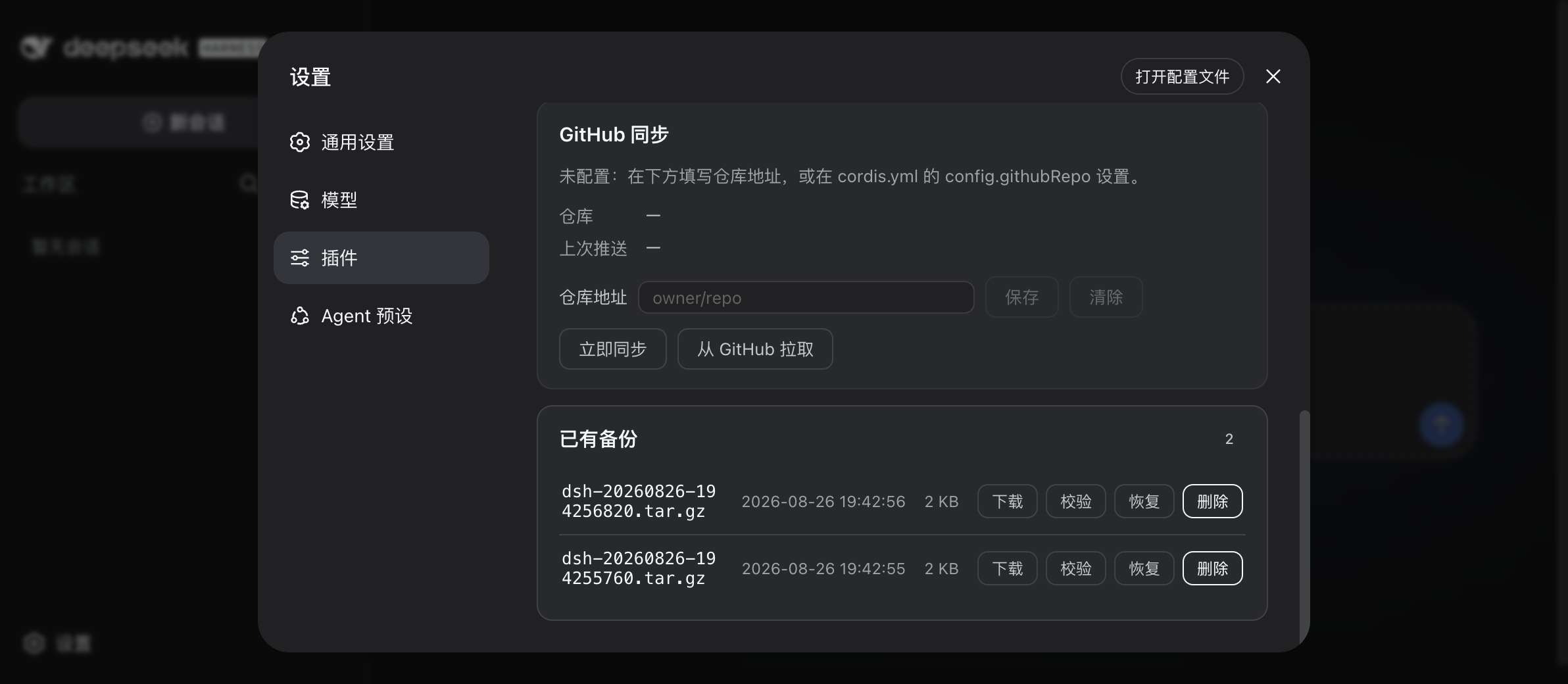
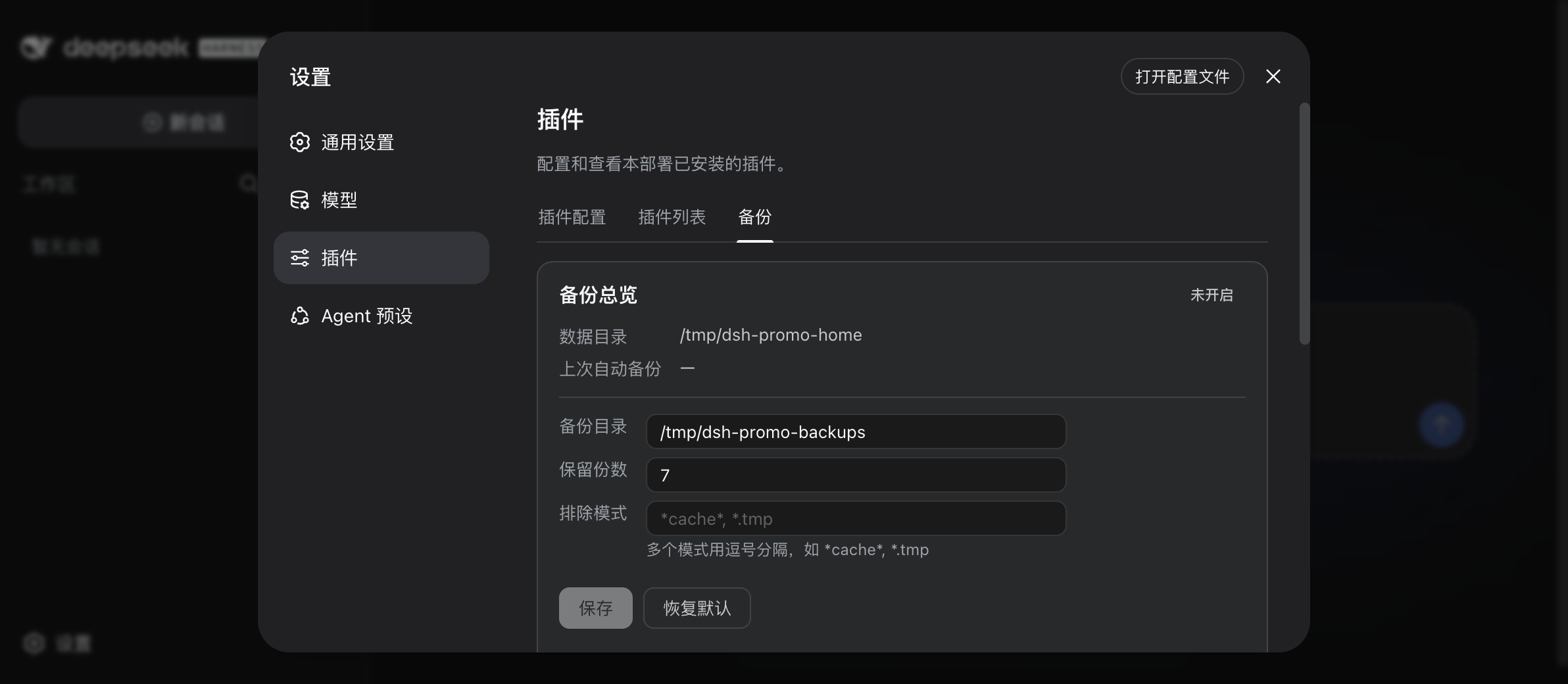
不想敲命令也行:dsh web → 设置 → 插件 → 备份 里有可视化面板——列备份、校验、恢复、删除、改设置,全都立即生效不用重启。
它替你挡掉哪些事
| 你担心的 | dsh-backup 做的事 |
|---|---|
| 「升级把环境搞坏了」 | 宿主版本一变就自动拍 dsh-pre-upgrade- 快照——放心试新版,坏了随时回滚 |
| 「我误删 / 改坏了东西」 | /backup restore latest --dry-run 先预览要恢复什么再动手;恢复失败自动回滚并给出结果回执 |
| 「DSH 根本起不来了」 | 每次备份都会往备份目录放一个零依赖的救援控制台(dsh-rescue / rescue.mjs,或双击「点我恢复」)——不依赖 DSH 的网页版恢复界面 |
| 「API Key 会被传到云上吗」 | 凭据默认脱敏,不进备份包;明文只存本机 vault,永不离开这台机器 |
| 「会话日志损坏了」 | /backup doctor 体检并从备份定点修复;损坏文件先隔离再入档,防止轮换把好副本也带走 |
| 「升级后老会话打不开了」 | /backup migrate-check 迁移预检:升级前静态扫描全部会话,预测哪些会被新宿主拒绝、挂在哪条规则;旧版扁平凭据文件在宿主改写前自动存底 |
| 「换新电脑了」 | GitHub 同步:/backup github pull 拉回云端备份,restore --sync-deps 顺手重装插件 |
| 「备份悄悄坏了没人知道」 | 每份归档带 sha256,/backup verify all 随时体检;每日/每周分级保留,留得住有用的历史 |
| 「我会忘记备份」 | /backup auto 12——每 12 小时自动跑,重启不中断,旧副本自动轮换(默认保留 7 份) |
遇到具体报错? 按症状与报错原文查的排错手册:故障排查(会话打不开、29 字节空包、面板消失、Token 按钮报错、换机迁移……各条的版本与修法都写明)。
安装
要求:macOS / Linux / Windows 10+(自带 tar),DSH 0.1.1-rc.2+(0.1.1 / 0.1.2 / 0.1.5 / 0.1.6 / 0.1.7 列车均已实测,0.2.0 列车自 0.13.2 起支持;当前兼容状态见 兼容性矩阵)。
dsh plugin --profile web add @xiaoyuyu6420/dsh-backup
# 或者直接从 GitHub 安装:
dsh plugin --profile web add github:xiaoyuyu6420/dsh-backup
装完重启 dsh web 后插件才生效。
安装时可能刷出
✕ missing peer @deepseek-ai/...警告,属预期现象:这些 peer 包由 DSH 宿主在运行时提供,不装在 profile 目录里。只要命令以Done结尾就是装成功了。
快速上手
- 按上面装好插件,重启
dsh web - 输入
/backup - 搞定 —— 备份出现在
~/Desktop/dsh-backups/,文件名带时间戳,旁边一份.sha256
想定时自动跑?/backup auto 12(每 12 小时一次;off 关闭,status 看状态)。
命令速查
| 场景 | 命令 |
|---|---|
| 立即备份 | /backup |
| 分类型备份(只备份选中类型) | /backup --types skills,sessions(可选:credentials·mcp·skills·sessions·settings·profiles;--only 同义) |
| 定时备份(重启不中断) | /backup auto 12 · off · status |
| 恢复(先预览) | /backup restore latest --dry-run |
| 正式恢复 | /backup restore latest |
| 分类型恢复(merge,不动其他类型) | /backup restore <归档> --types skills |
| 列出备份 | /backup list |
| 校验完整性 | /backup verify [前缀|all] |
| 会话日志体检/修复 | /backup doctor · --repair [前缀|latest] |
| 升级前迁移预检 | /backup migrate-check |
| DSH 起不来时自救 | 双击备份目录里的「点我恢复」,或 dsh-rescue / node rescue.mjs |
| 删除 / 保留策略 | /backup delete <前缀|latest> · /backup --keep N(默认 7) |
分类型备份
只想备份/恢复某几类数据?--types(或 --only)按内容类型子集操作,可选类型:credentials(凭据/api key)、mcp(MCP 配置)、skills(技能)、sessions(会话)、settings(设置)、profiles(插件 profiles)。
- 备份:
/backup --types skills,sessions生成dsh-t-前缀的子集归档,与全量备份分开轮换、互不挤占保留份数 - 恢复:
/backup restore <归档名> --types skills只把 skills 合并回现有~/.dsh(先--dry-run预览;覆盖的现有文件自动留档.pre-merge-*),其他类型完全不碰 - 凭据类型特殊:
--types credentials会把 api key 明文打进归档(默认全量备份是脱敏的)——这类归档绝不进 GitHub 同步,仅建议本机保存或手动拷到新机 - 安全护栏:分类型归档不带
--types直接整包恢复会被拒绝(防止误覆盖丢数据);rescue 救援通道同样不列、不整包恢复它们 - 面板(Settings → 插件 → 备份)同样支持:备份按钮下方勾选类型;分类型归档在独立分区展示与恢复
换新电脑
前提:旧电脑配过 GitHub 同步(配置方法)。
- 新电脑装好插件,配置里填同一个
githubRepo /backup github pull—— 拉回云端备份/backup restore latest --sync-deps—— 恢复并重装插件依赖- 重启
dsh
常见问题
API Key / 密码会进备份包吗? 不会。已知的凭据文件打包前会脱敏,明文留在本机 vault 里不离开这台机器;恢复时自动还原。
到底备份了什么?
~/.dsh 下的全部——会话、设置、技能、插件配置——减去你配置的排除模式和 node_modules。
我把 ~/.dsh 搞坏了,dsh 都启动不了,还有救吗?
有——这正是救援通道的用途。每次备份都会往备份目录写 rescue.mjs 和双击启动器(macOS .command / Windows .bat / Linux .sh)。它只用普通 Node 就能跑,不需要 DSH,起一个本地网页让你浏览和恢复备份。
升级后老会话打不开了怎么办?
先别再点开它。运行 /backup migrate-check:静态扫描全部会话日志,告诉你哪些会话会被新宿主拒绝、挂在哪条规则(subagent descriptor 旧版本、插件注入的历史事件等),并检查文件系统硬链接支持。升级前先 /backup 拍一份,坏掉的会话可用 /backup doctor --repair 从更早的归档定点修复。
支持 Windows 吗?
支持——Windows 10+(用系统自带 tar),救援启动器是 .bat 文件。
备份默认放哪?
~/Desktop/dsh-backups/——在面板(设置 → 插件 → 备份)里随时可改,立即生效不用重启。
反馈
用过吗?哪里坏了、缺什么、喜欢什么,都欢迎说——反馈直接决定路线图:
更新日志
最近的版本
- 0.13.4 —— 元数据版(无代码与行为变更):npm 描述与关键词对齐检索用词——补入「迁移 / 换机 / 插件 / MCP / 技能 / 会话 / 工作区」等,让"搬家换机、升级翻车"场景的人在 npm 搜索里能找到本插件。功能、归档格式、设置项、RPC 与 0.13.3 完全一致;升级到本版与停留在 0.13.3 在行为上没有任何区别。
- 0.13.3 —— 三条真实用户报障的修复 + 两个自建缺陷修复,全部在四条宿主列车(0.1.5-rc.3 / 0.1.7-rc.2 / 0.2.0-rc.2 / 0.2.1-alpha.1)真机 e2e 各 41/41 复验:① 含附件的归档恢复全链路不可用(#112,@zevs281):DSH 附件库用硬链接(tar 记为
h条目),而恢复校验器只放行-/d——0.13.2 及更早对这类归档的完整恢复/dry-run/分类型合并/doctor 修复一律拒绝。修法:条目与目标都在备份根内的硬链接放行(符号链接、设备仍拒)。② 大归档恢复被误拒(#119,@Yoshino-JF):归档清单超过宿主 subprocess 的 spill 上限时宿主会丢弃 spill 文件、只留 8 KB 尾窗,校验器把"断在文件名中间的碎片"当成不安全条目 → 整包拒绝(备份成功、verify 报完整、只在恢复时炸)。修法:清单改走原始流逐行校验(无上限,发现违规立即终止)。③ doctor/migrate 看不见 v4 会话日志(#117,@xiuwufangoc-design):宿主 0.1.7 起会话格式为 v4(session.v4.jsonl.zstd),而文件名与校准代写死到第 0 代/v3——体检与迁移预检一份都扫不到。修法:按宿主同源形态匹配文件名、校准代推进到 v4、更新代只提示。④ 一键更新跨不过 minor(#115):pnpmupdate只在声明范围内升级,跨 minor 停在旧版且回执谎报成功。修法:update --latest+ 跑完读回 profile 内真实版本核对。⑤ 迁移预检误报(#113,@zevs281):未知source.kind从"判打不开"降级为提示,名单对齐宿主权威集合(真机曾把 81/82 份健康日志误报)。 - 0.13.2 —— 适配 dsh 0.2.0 列车:peers/engines 追加
^0.2.0-rc.1(宿主自 0.1.7-rc.1 起有安装期兼容闸门,不覆盖会被拒绝安装);修复 0.1.7 起失效的设置表单(宿主改从条目 Config schema 派生表单且只认volatile字段——本插件导出Config并逐字段.volatile(),设置卡片恢复可读可写);修复 Windows 调度器启动卡死(#103:流式哈希 + 启动宽限 + 尝试锚点落盘);review P2 债清偿与产品内 Star 入口。 - 0.13.1 —— 修复两个面板问题(均感谢用户报告):① 0.1.6+ 宿主上面板标签静默消失(#94,@jackovibe):宿主 0.1.6 起要求客户端 Remote 贡献的 strict codec 带
create()惰性工厂(旧版只读schema),缺失时$mount在校验阶段抛错且只有 console 日志——标签页因此永不注册。修法:strictCodec()同时提供schema与create(),两代宿主共用同一 zod 实例;$mount改为声明式等待remote服务就绪(0.1.6 客户端模块按依赖图结算);并新增BackupTabFallback降级标签页——万一挂载失败会在面板位置给出可见提示与命令指路,不再静默消失。peers/engines 追加^0.1.6-alpha.1 || ^0.1.7-alpha.1(0.1.6-alpha.2 / 0.1.7-alpha.2 / 0.1.7-rc.1 / 0.1.7-rc.2 实机验证通过)。② 「GitHub Token」保存按钮报错(#97,@CheeseTJ):客户端panel代理漏接了setGithubToken(该 RPC 0.12.0 加入宿主半时即漏,因当时面板无入口而潜伏两版)。修法:补接该行,并给 smoke-client 加「panel 面必须与贡献 descriptors 一一对应」的防漏断言。 - 0.13.0 —— 更新感知 + 一键更新(#A+B):①
/backup check-update与面板「插件更新」卡——查 npm 最新版(8s 超时、断网静默降级,绝不阻断运行),发现新版即出现「更新到 x.y.z」按钮;设置项updateCheck(默认关)开启后打开面板自动静默检查一次(本插件不联网上报,检查只读 registry)。②/backup update [--profile 名]一键更新——更新前自动留dsh-pre-upgrade-升级前快照(失败可/backup restore回滚),再走官方dsh plugin --profile <名> update(pnpm 语义,插件不自己覆写依赖文件),完成提示重启 dsh web 生效。说明:宿主在启动时结算插件 Loader 树、插件是 profile 的 pnpm 依赖,运行中热替换(不重启生效)在宿主现行架构下不可行——一键更新 + 重启是此架构下的最佳形态。 - 0.12.2 —— 修复 Windows 数据安全隐患(#88,感谢 @Liuyeyuyangy0 出色的报告):
DSH_HOME位于盘符根目录(如D:\dsh_data)时,求父目录的字符串截取退化成裸盘符D:,tar -C D:在 bsdtar/GNU tar 下必然失败——而 tar 失败前已创建归档文件,留下 29 字节空壳被面板当正常备份列出(无.sha256/.meta.json,静默零可用备份;恢复、doctor 修复、rescue 救援通道同样中招)。备份/恢复/修复/救援共 7 处 tar-C统一改传补过分隔符的父目录;paths()对DSH_HOME补上与 HOME 一致的尾斜杠归一化(尾斜杠曾让 tar 位置参数变空串、产出 0 字节坏包);tar 失败路径删除空壳归档再抛错,失败不再静默。smoke 新增场景 28(四种路径布局断言 + 尾斜杠真实备份 e2e)。归档格式、设置项、RPC 均不变。 - 0.12.1 —— 修复 client bundle 顶层
var module/var exports泄漏为全局变量(#85,感谢 @geyonder 报告):CJS shim 移入__ModuleLoader__.loadfactory 体内,不再创建window.module——此前会把 Monaco 的 AMD loader(dsh-vscode-mode 等)误判成 Node 环境并破坏同页插件。冒烟测试新增经典脚本全局泄漏回归断言(vm.runInContext)。纯 client 半区修复,node 侧行为与归档格式不变。 - 0.12.0 —— 迁移安全网第一弹,对准官方社区集中爆发的「升级后老会话打不开」(#6151/#6297/#6355):①
/backup migrate-check迁移预检——升级前静态扫描全部代会话日志(v0/v1/v2/v3),预测哪些会话升完会打不开、挂在哪条规则(descriptor v2、permission/preset origin、冻结清单外事件类型、自定义来源 kind、seq 漂移、文件名代际不一致……规则烤入自宿主 0.1.5-rc.2,摘要如实标注覆盖边界),并探测文件系统硬链接支持(exFAT 上宿主发布会失败的 #6358 场景);② 凭据哨兵——旧扁平布局的.credentials.yaml会被宿主原子替换成 version:1(不可逆),检测到即先自动存底 vault 再让宿主动它。③ GitHub token 面板直配——设置面板(或/backup github token <token>)直接粘贴保存,存本机备份目录github.token(0600,不进归档、不进 GitHub 同步),优先于环境变量,跨机恢复后重填。另:新增engines.dsh声明(插件市场的兼容卡片读取它)。 - 0.11.3 —— 跟进 dsh
0.1.5列车:peerDependencies 追加^0.1.5-rc.1(0.11.2 在 0.1.5 宿主上会报 peer 警告)。兼容实测:宿主0.1.5-rc.2真机 e2e 32/32;六个 node 侧 peer 包 rc.1↔rc.2 逐字节相同(tarball diff),client 包列车未动——本次升列车零适配面;跨列车原地升级 e2e(rc.1 宿主 + 0.11.2 → rc.2 宿主 + 0.11.3)14/14,设置与归档无损。顺带修了升级 e2e 脚本自身的一个坑:新版期望版本从写死改为从 tarball 动态推导,换版本对不再改脚本。 - 0.11.2 —— doctor 行级 SessionHeader 校验对齐宿主
isHeaderLine(闭环 0.11.0 已知遗留):补version/createdAt/delegationDepth类型与非负安全整数三连(含-0拒绝)、seedLength/origin/agentPreset可选分支、退役字段sandboxMode/approvalPolicy——宿主拒载的 header 不再被误报健康。对照双列车宿主编译产物逐字段验证(rc.1 为严格超集),独立复核结论 ALIGN;测试套新增 11 种坏 header 负样本 + 修复往返。 - 0.11.1 —— 适配 dsh
0.1.2-rc.1:跟随@deepseek-ai/dsh-settings移除settingsNamespace(改用普通dsh-backup命名空间注册——取值完全一致,原地更新后设置、备份与旧归档全部无损),支持 Web 强制鉴权(303 + HttpOnly cookie),peer 范围放宽为^0.1.1-rc.2 || ^0.1.2-rc.1。双列车真宿主 e2e 各 32/32 通过,另做了 0.11.0 → 0.11.1 原地升级测试(设置保留、旧归档可恢复)。 - 0.11.0 —— doctor 容器契约校验:首帧必须解出「恰好一行 header、单个换行结尾」(字节精确,对齐宿主读端)。单帧重写、首帧多余空行、缺行尾、skippable 帧现在都会判损坏(此前报健康但宿主拒载);救援台同步。来自 deepseek-harness 官方讨论区 #1047 的社区审计。
- 0.10.0 —— 分类型备份:只备份需要的部分(
/backup --types skills,sessions),按类型 merge 恢复(/backup restore <归档> --types skills);类型归档独立轮换不挤全量配额。含凭据的类型归档永不进 GitHub 同步,跨机护栏不变。 - 0.9.1 —— 面板新增反馈入口;README 重做。六路 agent UX 深审后的加固:恢复确认按钮补主题色兜底重新可见、修复恢复快照时自毁目标快照的 bug、双击救援启动器自动探测 node、报错文案全面改为"人话 + 下一步"。
- 0.9.0 ——
/backup doctor会话日志体检与定点修复;宿主起不来也能用的进程外救援通道(备份目录里的 dsh-rescue / 双击启动器);恢复失败自动回滚与结果导向回执;智能备份:宿主升级前自动快照、损坏会话先隔离再入档、每日/每周分级保留。 - 0.8.0 —— 面板里直接改备份设置(目录、保留份数、排除模式),立即生效写入 settings.yaml 不用重启;两处同时改有冲突提示,不会静默覆盖。
- 0.7.x —— 凭据脱敏(本机 vault)、跨机恢复。
更多
定时备份策略、敏感文件脱敏、GitHub 同步、恢复保护机制、配置参考、故障排查、开发说明——都在进阶文档。跨运行时兼容性说明:compatibility.md。
致谢
- @beastrobin —— #1 中对保留方法名的根因分析,直接促成 v0.5.1 修复
- @mlosun —— #2 中详尽的复现与根因报告
- @Choi-Peng —— #5 中协助把受影响用户指引到修复版本
支持这个项目
如果 dsh-backup 帮到了你:⭐ 给个 Star 是最直接的鼓励,也能让更多 DSH 用户找到它。遇到问题或有想法,欢迎到反馈帖留言。
许可证
MIT