LangSmith Tracing for Claude Code
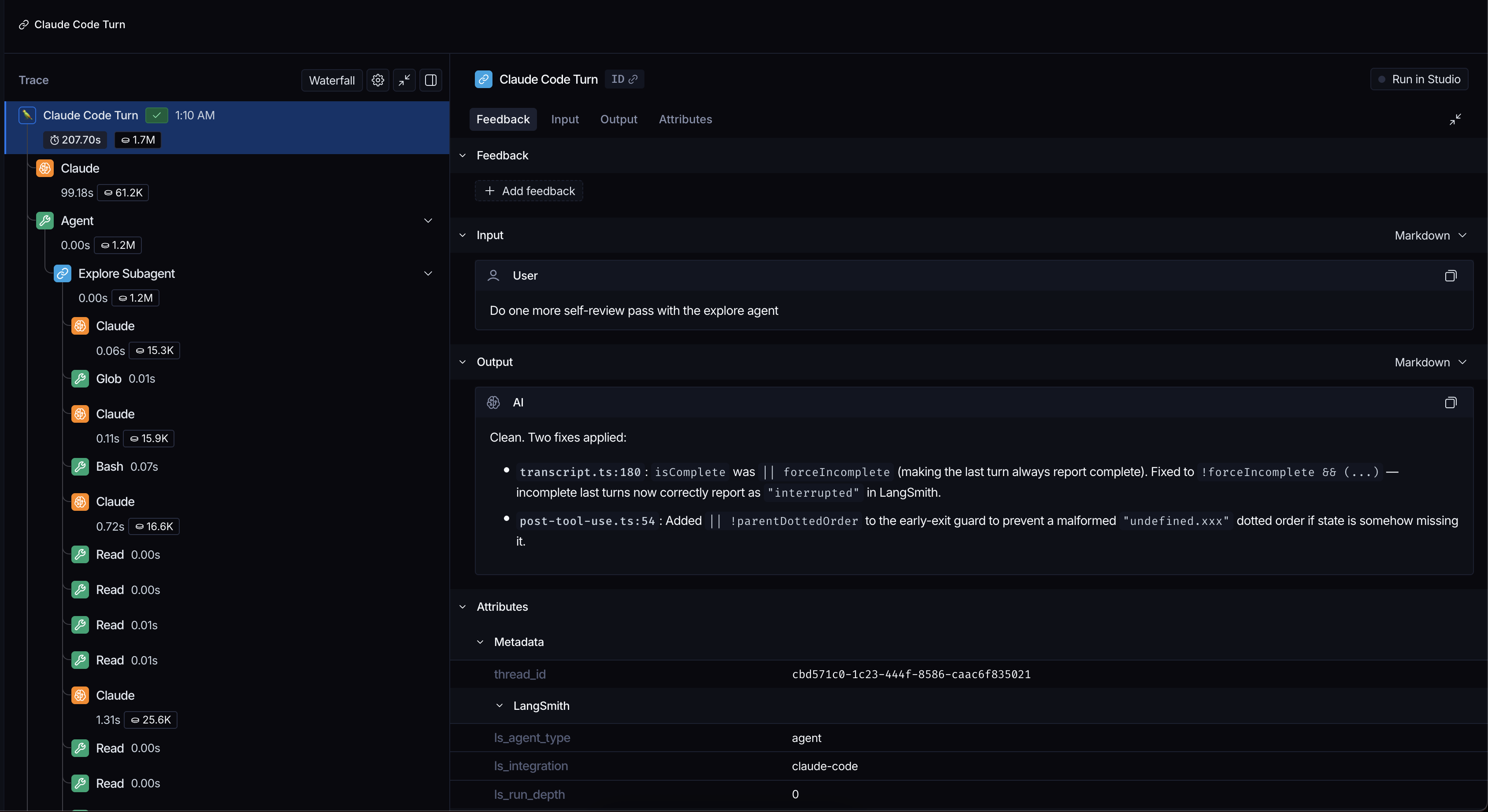
Sends your Claude Code conversations to LangSmith so you can see what the agent actually did.
What you need
- On a Mac: nothing. The plugin carries its own build and runs it directly.
- On Windows and Linux: Node.js 20 or newer.
- A LangSmith account.
Node is still worth having on a Mac because the plugin falls back to it if its own build can't start.
Install
Install for yourself
Run these inside Claude Code:
/plugin marketplace add langchain-ai/langsmith-claude-code-plugins
/plugin install langsmith-tracing@langsmith-claude-code-plugins
/reload-plugins
Auto-update is off for this marketplace by default. Turn it on in /plugin under Marketplaces or update by hand with claude plugin update langsmith-tracing@langsmith-claude-code-plugins. The new version loads in your next session.
Using Claude Cowork? See Tracing Claude Cowork to install the plugin there.
Install for your organization
Admins can install the plugin for everyone through Claude Code's managed settings. See Manage Claude Code plugins for your organization for how, or Choose a rollout route to cover claude.ai and Cowork too. Then use the managed file below to switch tracing on and set the project for everyone.
Lock settings with a managed file
An admin can lock any setting in the Settings table except profile with a managed file at ~/.langsmith-plugins/managed.json in each user's home folder. It overrides every other file and environment variable and works on macOS and Linux. Admins usually install it on each machine with an MDM tool, which manages company laptops (such as Jamf, Kandji or Microsoft Intune).
The plugin only trusts the file when:
- Root owns the file and its folder
- No other user can write to either
- Neither is a symlink
If the file is broken or fails these checks then tracing stops and Claude Code explains why. See the settings guide to set it up.
Authenticate
The simplest option is to sign in once with the LangSmith CLI, which you can install from its docs if you don't have it yet:
langsmith auth login
If you use the CLI sign-in and have more than one profile set profile to the one the plugin should use. Your own api_key ignores this setting, but a generic LANGSMITH_API_KEY isn't used as a fallback while profile is set.
You can use an API key instead by setting api_key in your config file. Create one at smith.langchain.com under Settings then API Keys.
If more than one credential is set the plugin uses the first one it finds:
- The plugin's own key from
api_keyorCC_LANGSMITH_API_KEY - Your
langsmith auth loginsign-in - A generic
LANGSMITH_API_KEYin your shell
When your sign-in expires or your key is rejected the plugin stops uploading but still lets your prompts through. Turns from that gap never upload their content, and Claude Code shows a reminder in the chat at most every 2 minutes until you fix it. Use notice_cooldown to change that interval or set it to off to hide the reminders.
Strict auth
Strict auth refuses every prompt until your sign-in or key works again, even if no credentials were ever set. Turn it on by setting strict_auth to true. It's off by default and has no effect while tracing is off.
Strict auth also blocks
claude -p. Leave it off in CI unless a failed sign-in should fail the job.
Turn on tracing
Tracing is off until you switch it on in ~/.claude/langsmith.json, unless your admin already turned it on with a managed file. Send traces to an agent with agent_id:
{ "enabled": true, "agent_id": "shared-claude" }
Or send them to a project with project:
{ "enabled": true, "project": "shared-claude" }
Use either one, and agent_id wins if you set both. With neither set traces go to the claude-code project. Send a message and look for it in LangSmith.
A project can override these settings in <project>/.claude/langsmith.json and any setting in your shell beats the files. Advanced configuration lists every location.
Check a repository's tracing settings before you trust it. A cloned repository can switch tracing on and send your conversations to someone else's server. Review its
.claude/langsmith.jsonandlangsmith-plugins.jsonalong with.claude/settings.jsonand.claude/settings.local.json.
What gets traced
Each model call includes the conversation so far and the reply along with the model name, provider and token counts. Tool calls include their inputs and outputs and skill calls record which skill ran. Subagents appear nested under the turn that started them.
A tool call that touches a file inside a git repo is tagged with the repository name, branch, commit and author. A subagent only uploads once it finishes, so cancelling one drops its steps. Run /langsmith-tracing:trace to get a link to the current conversation's trace.
Hide a conversation
To keep one conversation's content out of LangSmith run these inside Claude Code:
/langsmith-tracing:mute
/langsmith-tracing:unmute
The confirmation appears as a prompt blocked by a hook. That's how Claude Code shows a plugin's reply, so nothing went wrong and the command never reaches the model.
A muted conversation keeps its structure in LangSmith but leaves out what was said. Muting starts from your next turn so wait for the confirmation before you send anything sensitive. It only changes what reaches LangSmith and doesn't delete earlier uploads.
Set defaultMuted to true to mute every conversation by default. A conversation you mute or unmute by hand keeps that choice.
When nothing shows up
- No runs at all. Check that the plugin is installed and enabled in
/pluginand that tracing is on. ATRACE_TO_LANGSMITHin your shell overrides your config files. - Tracing is paused. Your sign-in expired or your key was rejected. Run
langsmith auth loginagain or replace the key and tracing resumes from the next prompt. - Runs in the wrong project. Check
projectin your config file andCC_LANGSMITH_PROJECTin your shell. - Still stuck. Set
CC_LANGSMITH_DEBUG=trueand check~/.claude/state/hook.log. The background uploader logs to~/.claude/state/langsmith_engine/worker.log.
Privacy
With tracing on each turn uploads your messages, tool inputs and outputs, metadata, token usage and subagent structure. A muted turn uploads only the structure.
Secrets are stripped before upload unless you turn redact off. This covers API keys, JWTs, PEM blocks and common credential patterns in variables, headers and URLs. Redaction isn't a guarantee, so keep tracing off if none of this can leave your machine.
Settings
Each setting has a config file key and an environment variable. The environment variable wins when both are set.
| Config key | Environment variable | Default | What it does |
|---|---|---|---|
enabled |
TRACE_TO_LANGSMITH |
false |
Whether to trace at all |
api_key |
CC_LANGSMITH_API_KEY |
none | Your LangSmith key |
project |
CC_LANGSMITH_PROJECT |
claude-code |
Where runs land |
agent_id |
LANGSMITH_AGENT_ID |
none | Agent to trace to, instead of project |
api_url |
LANGSMITH_ENDPOINT |
https://api.smith.langchain.com |
Which server to send to |
defaultMuted |
CC_LANGSMITH_DEFAULT_MUTED |
false |
Leave content out unless told otherwise |
redact |
CC_LANGSMITH_REDACT |
true |
Strip secrets before upload |
redact_extra_rules |
CC_LANGSMITH_REDACT_EXTRA |
none | Extra patterns to strip |
metadata |
CC_LANGSMITH_METADATA |
none | Custom fields on every run |
replicas |
CC_LANGSMITH_RUNS_ENDPOINTS |
none | Send the same trace somewhere else too |
strict_auth |
CC_LANGSMITH_STRICT_AUTH |
false |
Refuse prompts until you sign in again |
notice_cooldown |
CC_LANGSMITH_NOTICE_COOLDOWN |
2 |
Minutes between reminders, or off |
profile |
none | the CLI's current one | Which CLI login to use |
workspace_id |
none | the login's own | Workspace for a login's traces |
profile is personal so the managed file can't lock it. LANGSMITH_PROFILE and LANGSMITH_WORKSPACE_ID are only used when no profile or workspace_id is set in a settings file.
Set capture_hook_outputs (CC_LANGSMITH_CAPTURE_HOOK_OUTPUTS) to true to add the text your own hooks give Claude to the turn or tool call it belongs to, which is off by default.
More
- Running in CI, nesting under another run, sending to a second project and where settings can live
- Tracing Claude Cowork tasks
- The separate
langsmith-gatewayplugin, which routes model requests through LangSmith and is unrelated to tracing
Development
pnpm install
pnpm test
pnpm build
Run pnpm build and then claude --plugin-dir /path/to/langsmith-claude-code-plugins/plugins/langsmith-tracing. Send a new message to pick up your changes.
License
MIT