claude-brewcode




Claude Code mods: type ++r and get a whole review block; read it before you send, add your own with /placeholders. Plan mode raises effort to xhigh. /remind keeps a reminder in a file until a later session shows it. See the mods
Claude Code plugin suite. Keeps big tasks on track: bounded units, a six-field brief per spawn, the plan re-anchored after a compaction. 4 plugins, 27 skills, 10 agents. Full documentation | Approaches | Update
Security: code is scanned on every commit (Gitleaks, CodeQL, Semgrep); no personal data is collected or transmitted.
Install in 30 seconds
❗ Update Claude Code first: mods need Claude Code 2.1.301 or newer. Run claude update, restart, then paste this prompt:
Run in order, show full output; stop if `claude --version` < 2.1.301; end with `/reload-plugins`:
1. claude plugin marketplace add https://github.com/kochetkov-ma/claude-brewcode
2. claude plugin install brewmod-placeholders@claude-brewcode
3. claude plugin install brewmod-plan-effort@claude-brewcode && claude plugin install brewmod-reminders@claude-brewcode
4. claude plugin install brewcode@claude-brewcode && claude plugin install brewdoc@claude-brewcode
5. claude plugin install brewtools@claude-brewcode && claude plugin install brewui@claude-brewcode
Already installed? Update
Short steps for you and your LLM, including what to try after the update: UPDATE.md. With brewtools installed, /brewtools:plugin-update does the whole update in one run and offers the mods and plugins you are missing. Then /reload-plugins, and in each project /brewcode:setup-status upgrade brings the setups generated there current. Or paste this prompt:
Run in order, show full output; stop if `claude --version` < 2.1.301; end with `/reload-plugins`, then tell me to type `/brewcode:setup-status upgrade` in each project:
1. claude plugin marketplace update claude-brewcode
2. claude plugin update brewmod-placeholders@claude-brewcode
3. claude plugin update brewmod-plan-effort@claude-brewcode && claude plugin update brewmod-reminders@claude-brewcode
4. claude plugin update brewcode@claude-brewcode && claude plugin update brewdoc@claude-brewcode
5. claude plugin update brewtools@claude-brewcode && claude plugin update brewui@claude-brewcode
Claude Code mods
Tiny add-ons, one feature each, one command to install. brewcode.app/mods | Docs

❗ Update Claude Code first: mods need Claude Code 2.1.301 or newer (claude --version; claude update, then restart Claude Code) and node on the PATH.
| Mod | Type this, get that | Install |
|---|---|---|
| brewmod-placeholders | ++r in a prompt: a whole review block. /placeholders <what you want>: Claude drafts your own |
claude plugin install brewmod-placeholders@claude-brewcode |
| brewmod-plan-effort | Enter plan mode: effort goes to xhigh while Claude plans. /plan-effort max sets the level |
claude plugin install brewmod-plan-effort@claude-brewcode |
| brewmod-reminders | Say "remind me tomorrow 9:00 to check prod": a Markdown file in the repo, shown above the prompt once it fires (action, note or someday); run it with **1. /remind shows, snoozes, edits, closes |
claude plugin install brewmod-reminders@claude-brewcode |
First time: claude plugin marketplace add https://github.com/kochetkov-ma/claude-brewcode, then /reload-plugins after installing.
Team/Enterprise organizations, the brewtools 6.7.x double injection and legacy codeword overrides are covered in the mods overview.
Top 5 features
1. Prompt placeholders: the headline feature
Type ++r and Claude receives a whole review-discipline block. A band above the prompt shows exactly the text it will get before you press Enter. Your own placeholders take one command: /placeholders add ....
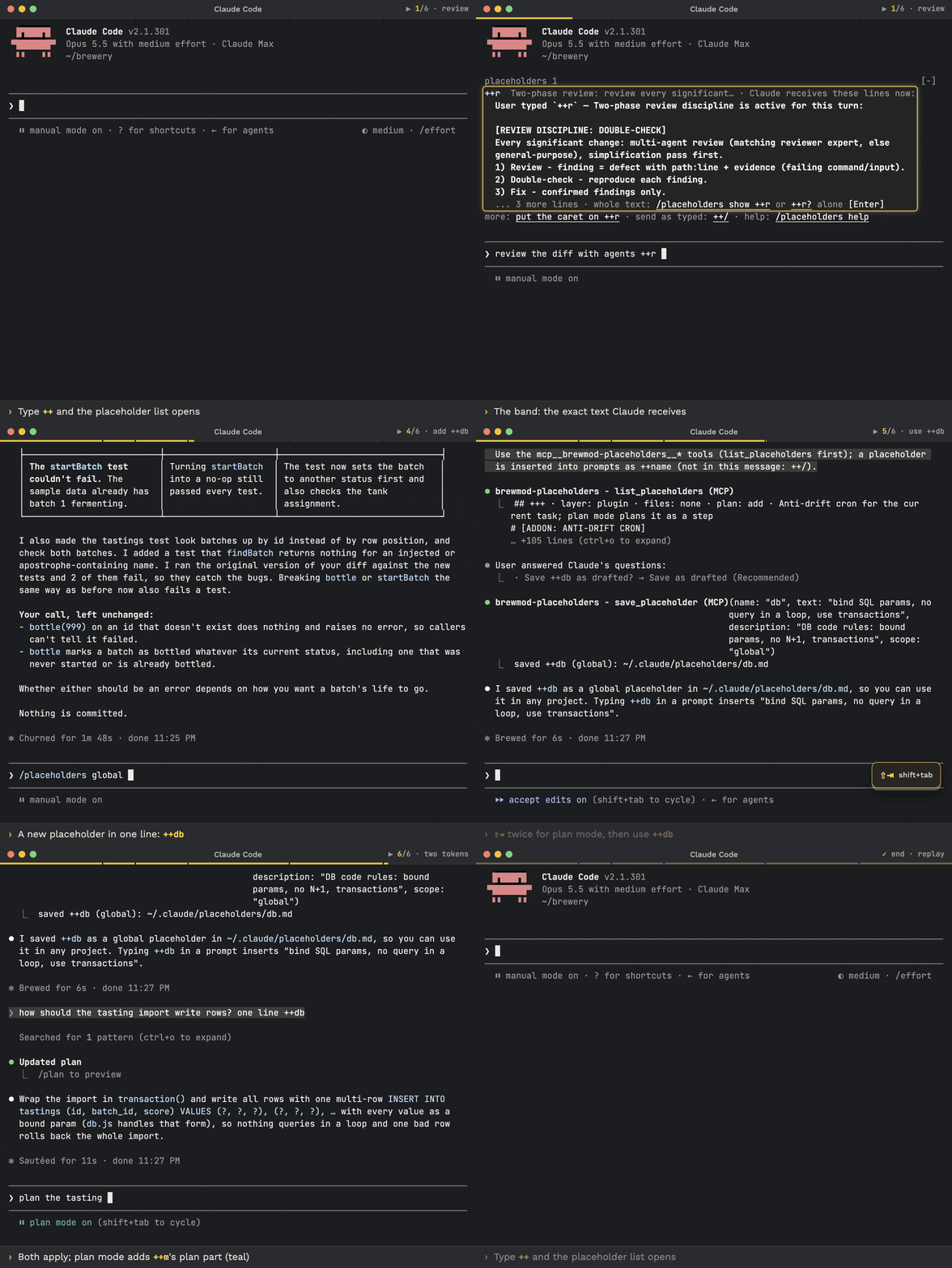
| You do | What happens |
|---|---|
Type ++ |
Typeahead lists the names; Tab inserts one |
Put the caret on ++r |
The band shows what Claude receives (up to 15 rows, the plan-mode addition marked) |
| Press Enter | Your prompt is sent as typed; the block goes along as hidden context, absent from the transcript |
++r? alone, Enter twice, or /placeholders show ++r |
Prints the whole text locally, no Claude turn |
/placeholders add ++ship: run the tests; in plan mode also list the release steps |
Claude drafts it, asks once, saves ship.md and ship.plan.md |
++/ in a message |
The message is sent exactly as typed, no block |
Built in: ++m (manager mode: delegate, never code), ++a (architecture first), ++r (two-phase review: review, reproduce, fix confirmed findings only), ++rr (anti-regression review) and +++ (an anti-drift cron for the current task).
Your files are <name>.md in ~/.claude/placeholders/ (global) or .claude/placeholders/ (project, wins). A <name>.plan.md adds text in plan mode only. Docs | brewmod-placeholders
2. Skills and agents built with their own tooling
We create our skills and agents with the same commands you get:
| Command | Modes | Spawns |
|---|---|---|
/brewcode:skills |
status, list, create, improve, review, sync |
skill-creator |
/brewcode:agents |
status, list, create, improve, review, sync |
agent-creator |
sync re-verifies each skill or agent against the code and cuts before it adds. hook-creator and mod-creator do the same job for hooks and Claude Code mods (agents).
3. Domain teams of subagents
/brewcode:teams-setup reads your project and builds a team of domain agents under .claude/teams/<name>/ and .claude/agents/. Each agent profile has six ordered headings (Mission, Owned surfaces, Exclusions, Must-load references, Unique invariants, Unique verification). The roster gets one review-only intent-guard that checks what was asked against what was delivered.
/brewcode:teams-setup install a team for the payments module
Modes: status | install | upgrade | enable | disable | uninstall | purge. disable parks the roster; nothing is deleted.
4. Docs that stay current
/brewdoc:docsync-setup installs three project-local hooks: docsync-track logs every .md edit, docsync-watch logs reads, docsync-gate runs when Claude finishes a turn. For a doc edited in the session whose last_updated is missing or more than threshold_days behind the file, the gate blocks once and tells Claude to sync it. sync syncs the stale docs on demand.
/brewdoc:memory-sync-setup generates a project-local /memory-sync skill. It syncs everything Claude loads on its own (CLAUDE.md at any depth, rules, agents, skills, memory) against the code, without growing the files.
5. Publish to  brewpage.app
/brewdoc:publish shares text, Markdown, JSON, a file, a folder or a ZIP site as a public link. Your content lives at your own URL, not in a Claude artifact. No sign-up; pages expire after their TTL (default 15 days). Claude may run it mid-task when you ask it to share something.
/brewdoc:publish report.pdf --ttl 1
/brewdoc:publish docs/v1/ --entry hub.html
A private slug is unlisted, not locked: anyone with the link can open the page unless you set a password.
More
| Command | What you get |
|---|---|
/brewcode:superreview-setup |
A project-tailored deep-review skill: intent pass and mechanical gates, plus expert fan-out and adversarial validation at extended depth |
/brewcode:semble-setup |
A pinned semble_code MCP: semantic code search by intent |
/brewcode:convention-setup, /brewcode:rules |
Conventions behind a reversible loading rule (.claude/rules/convention.md); session learnings turned into project rules |
/brewtools:manager-setup |
Opt-in hard wall: a PreToolUse guard denies main-session edits and mutating shell commands, so the main agent delegates; subagents stay free |
Subagent guards: agent-deadline-setup, agent-return-setup, agent-router-setup |
A wall-clock budget per subagent (warning at 80%), a size budget on its final report, and a router that denies a generic spawn when a project expert owns the task (experimental) |
/brewtools:task-board-setup |
A file-based task board for any repo with a derived task graph and session anti-drift timers |
| compact-recall (hook, automatic) | After a compaction, re-injects the plan or intent and the task graph |
| brewmod-plan-effort | Plan mode raises effort to xhigh; /plan-effort max sets the level; your session effort is untouched elsewhere |
| brewmod-reminders | Durable reminders and checks as files (.claude/scheduled/ or ~/.claude/reminders/) that outlive the session, unlike a cron or /loop; the band shows only fired reminders, ** picks and runs one; kinds action, note, someday |
/brewtools:secrets-scan |
Scans git-tracked files for leaked secrets; --fix walks through remediation |
/brewtools:text-optimize, /brewtools:text-human |
Cut tokens from prompts and docs in place (-l, -s, -d, -x); strip AI artifacts from code, docs and commits |
Also shipped: /brewtools:ssh, /brewtools:deploy, /brewtools:provider-switch, /brewtools:context-slim, /brewcode:e2e, /brewdoc:md-to-pdf. Full list: Skills Reference.
Recommended flow
How the pieces fit, in the order they are used. Full page: doc-claude.brewcode.app/recommended-flow.
- Install once. ❗ Update Claude Code first: mods need Claude Code 2.1.301 or newer (
claude --version; below thatclaude update, then restart Claude Code), then the install prompt above or UPDATE.md. - Once per project.
/brewcode:semble-setup install,/brewcode:convention-setup install,/brewcode:teams-setup install,/brewcode:superreview-setup install; docs-heavy repos also/brewdoc:docsync-setup install. Check with/brewcode:setup-status. - Every bigger task. Start with
++m(manager: task graph and delegation); design in plan mode with++m(plan-effort raises effort toxhigh); long runs add+++(anti-drift cron). - Review.
++ror++rrafter each phase, the generated/superreviewbefore merge. - Share and stay current.
/brewdoc:publishreturns a link; update with the release prompt or/brewtools:plugin-update, then/reload-pluginsand, in each project,/brewcode:setup-status upgrade.
flowchart TD
    A["Install once<br/>Claude Code 2.1.301+<br/>mods and plugins"] --> B["Once per project<br/>semble, conventions,<br/>teams, superreview"]
    B --> C["Every bigger task<br/>++m, plan mode,<br/>+++ for long runs"]
    C --> D["Review<br/>++r or ++rr per phase,<br/>/superreview before merge"]
    D --> E["Share and update<br/>/brewdoc:publish,<br/>/brewtools:plugin-update,<br/>/reload-plugins,<br/>/brewcode:setup-status upgrade"]
    D -. "next task" .-> C
    E -. "new release" .-> A
Plugin Suite
| Plugin | Purpose | Skills |
|---|---|---|
| brewcode | Authoring toolkit: skill, agent and rule creation and sync, semantic search (semble), conventions, E2E tests, generated review and team skills | 9 |
| brewdoc | Documentation tools: docsync, memory-sync generation, PDF conversion, publishing | 5 |
| brewtools | Text optimization, secrets scanning, SSH and deploy, manager hard wall, subagent guards, task board, context slimming, plugin updates, alternative providers | 13 |
| brewui | UI/visual/creative tools (placeholder, currently empty) | 0 |
Installation
Install with the prompts above or run claude plugin install <plugin>@claude-brewcode per plugin. To update, open the update block under Install in 30 seconds or follow UPDATE.md. Run from source:
claude --plugin-dir ./brewcode --plugin-dir ./brewdoc --plugin-dir ./brewtools --plugin-dir ./brewui
| Component | Version | Purpose |
|---|---|---|
| Claude Code CLI | 2.1.309 reference for the plugins; mods 2.1.301+ | Plugin runtime |
| Node.js | 20+ | Hook runtime |
| macOS | 13+ | Supported OS (Linux and Windows planned) |
Quick Start
/brewcode:setup-status       # Inspect setup state and the recommended order; "upgrade" brings stale setups current
/brewcode:convention-setup   # Establish coding and testing patterns first
/brewcode:teams-setup        # Create agents that use those conventions
/brewcode:superreview-setup  # Generate a project-tailored deep-review skill
Commands for every plugin are in its README: brewcode, brewdoc, brewtools.
How It Works
  accepted task --> /task-spec --> research + Q&A --> spec + design
        │
        v
  project agents from .claude/agents/ --> bounded units, fanned out in ONE message
        │
        v
  /brewcode:superreview-setup --> project-tailored deep-review skill

  after a compaction: compact-recall re-injects the plan or intent and the task graph
One subagent = one bounded unit (one deliverable, ~5 files, ~10 steps); bigger work is split into N tasks spawned in one message. Every spawn carries six fields: GOAL, ROLE, SCOPE, CONTEXT, CONSUMER, DONE -- see the delegation contract.
Skills Reference
27 skills: brewcode (9: authoring, semble search, conventions, E2E, review and team generators), brewdoc (5: docsync, memory-sync, PDF, publish), brewtools (13: text, secrets, SSH, deploy, guards, task board), brewui (0).
-setupsuffix: 11 skills install a mechanism you use afterwards; all share the modesstatus | install | upgrade | enable | disable | uninstall | purge, and defaults are skill-specific (semble, manager, agent-deadline, agent-return, agent-router default tostatus).24 of 27 skills are user-invoked only (
disable-model-invocation: true): you type/plugin:skill. Exceptions Claude may run mid-task:/brewdoc:publish,/brewtools:text-optimize,/brewtools:text-human.
Portable skills (standalone)
Self-contained SKILL.md folders that ship outside the four plugins -- drop them into any compatible agent runtime. Both publish content to brewpage.app (text, markdown, files, multi-file sites) and return a shareable URL.
| Skill | Runtime | Path |
|---|---|---|
brewpage-publish |
Claude Code | skills/brewpage-publish |
brewpage-publish |
OpenClaw / AgentSkills | openclaw/brewpage-publish |
Agents (10 total)
| Agent | Plugin | Model | Purpose |
|---|---|---|---|
| skill-creator | brewcode | inherit | Create and improve Claude Code skills |
| agent-creator | brewcode | inherit | Create and improve Claude Code agents |
| hook-creator | brewcode | inherit | Create and debug Claude Code hooks |
| bash-expert | brewcode | inherit | Create professional shell scripts |
| mod-creator | brewcode | inherit | Create, test and ship Claude Code mods |
| bc-rules-organizer | brewcode | haiku | Internal: spawned by /brewcode:rules and /brewcode:convention-setup |
| setup-upgrader | brewcode | inherit | Internal: spawned by /brewcode:setup-status upgrade, one stale setup per spawn |
| text-optimizer | brewtools | sonnet | Optimize text and docs for LLM efficiency |
| ssh-admin | brewtools | inherit | Linux server administration via SSH |
| deploy-admin | brewtools | inherit | GitHub Actions deployment and CI/CD |
Every public agent stops and returns a split proposal when a task exceeds one bounded unit: scope guard. The two internal agents take one bounded unit by design.
Documentation
| Resource | Link |
|---|---|
| Full documentation, quickstart | doc-claude.brewcode.app / Quickstart |
| Plugin overviews | Brewcode, Brewdoc, Brewtools, Brewui |
| Mods overview | Mods |
| Release Notes | RELEASE-NOTES.md |
| Brewcode site | brewcode.app |
| brewdoc CLI -- standalone document-to-Markdown tool on PyPI, a separate product from the brewdoc plugin | pypi.org/project/brewdoc |
Development
claude --plugin-dir ./brewcode --debug   # Debug mode
[CLAUDE_CONFIG_DIR=<profile dir>] bash .claude/scripts/update-plugin.sh [plugin|all] [--dry-run]   # Update plugins; --dry-run changes nothing
bash .claude/scripts/bump-version.sh X.Y.Z      # Bump version everywhere
License
MIT, see LICENSE. Copyright (c) 2025-2026 Maksim Kochetkov (kochetkov-ma).
Reuse keeps the copyright notice from the license file and credits the project: claude-brewcode.