Bivy


Any coding agent. Any machine. From anywhere.
Bivy runs Claude Code, Codex, Pi or any agent you bring, on the subscriptions you already pay for. Run it on your laptop, your server, or a cloud computer that sleeps when the work stops. Follow the live session from your phone, try the app it built right in the chat, and send it back with notes.
Coding agents now work well on their own for long stretches. In a terminal, though, an agent is tied to one machine, one vendor, and you sitting in front of it. Bivy removes those limits: keep the agents you like, run them where the work is, and stay in the loop from wherever you are.
Start free on Bivy Cloud · Install on your machine · Documentation · Website
What you can do with Bivy
Use the agents you pay for, and switch when one runs out
Run Claude Code for one task, Codex for another, and Pi or OpenCode where they fit, side by side in one session list. Bivy runs the real agent CLIs, so each one works the way it already does, with its own login and configuration.
- Hit a usage limit? Keep going. Fork the session, code and conversation included, to another agent, or let Bivy pick it up again when the limit resets.
- Get a second opinion.
bivy delegate --to codex,claude@linuxsends one task to several agents, on this machine or another, and brings back each answer, branch and pull request. - Bring your history. Import existing Claude Code and Codex sessions.
Bring any agent, even one Bivy doesn't support yet
19 agents work out of the box: Claude Code, Codex, Pi, OpenCode and Grok are release-tested, and adapters cover Gemini CLI, Cursor, GitHub Copilot, Amp, Goose, Aider, Cline, Qwen Code, Crush, Auggie, Droid, Continue, Kilo Code and Rovo Dev.
For anything else, ask your agent to add it. bivy guide add-an-agent tells
it how: an ACP agent needs only its command, any other CLI takes a few lines
of config, and an agent with unusual output gets a small adapter script. The
agent writes it, runs a real test turn with bivy exec, and the new agent is
in the picker. No change to Bivy and no restart.
Add an agent → · Support matrix →
Sign in once, on every machine
Sign in to Claude or ChatGPT, or add an API key, and every machine you connect can use it, including your cloud computer. Sign-ins and keys sync end-to-end encrypted between your machines; the server stores only ciphertext.
When an agent needs a token for something else, such as a deploy key or a service API, it asks in the chat. You paste it once, and the agent gets a reference it can use, never the value itself.
Credential sync → · Credentials guide →
Run it on your computer, your cloud computer, or a fresh runner
Every session runs on a machine you pick, and you can move it later.
- Your computer or server. The agent uses your repo, local services, databases, caches, VPN and GPU as they are. Nothing to rebuild in a sandbox.
- Your cloud computer. One persistent machine with its own disk, so tools and logins you set up are still there next time. It sleeps when the work stops and wakes when you send a message, open a preview, or an automation fires.
- Cloud runners. A fresh machine for one task, so parallel work never shares a checkout. Delete the session and the runner goes with it.
Start at your desk and move the session to the cloud when you close the laptop. Machines dial out, so there are no ports to open.
Cloud computers and runners → · Multi-machine recipes →
Follow it from your phone
Open the same session in a browser, on your phone, or back in your terminal. Watch it live, answer questions, approve tool calls, open its terminal, send screenshots and files, or stop it. No app store install; the web app works as a PWA.
Agents can reach you too. Every session has the bivy CLI, so any agent with
a shell can talk back:
bivy notify                                           # push to your phone
bivy ask "Ship to staging?" --option Yes --option No  # waits for your answer
bivy attach report.png --caption "Before/after"       # show a file in the chat
The same commands are available as MCP tools. Add standing instructions for every session in Settings → Agent instructions.
Remote access → · Commands inside a session →
Try the app, not the diff
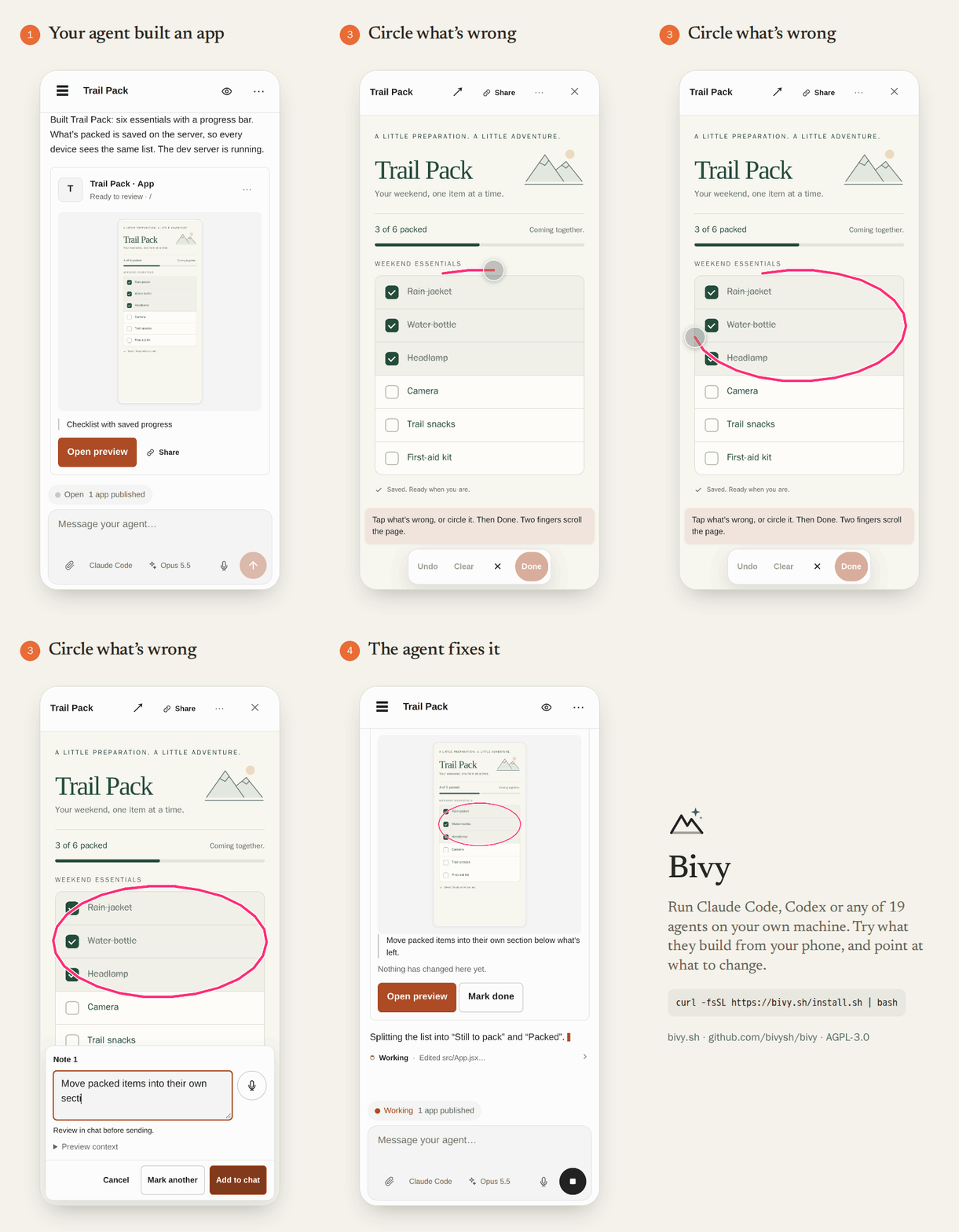
Bivy finds the dev server the agent starts and opens it beside the chat: web apps, terminals, even desktop apps.
- Try the running app, not a description of what the agent says it did.
- Mark what needs work. Press and hold, or circle it, and say what you want. The note reaches the agent with the element and page context.
- Follow each note. Every mark stays in the chat as a pin that shows Changed or Element gone on its own, or Done when you say so.
- Compare versions. The next version waits for you instead of reloading under you. Flip between before and now, then check the diff.
- Get a second opinion. Share a link for an hour, a day or a week. Reviewers try the app and leave notes without a Bivy account.
Previews need no per-app domains, certificates or tunnels. The machine serving the app must stay awake, and anyone holding a share link can use the app, live backend included, until it expires or you stop sharing.
Previews, feedback and sharing →
Let events start the work
A GitHub issue, a failed CI run, a Linear ticket, a Slack message, a schedule or any signed webhook can start a session. The agent works on the machine you chose and posts back a preview link or a pull request. You can join the session at any point, and reply in the same place.
bivy automation init       # writes .bivy/automations.yaml
bivy automation apply
bivy runs start "Review outdated dependencies and propose a small, tested update."
Automations live in your repository as code, so your agent can write them too. Each run ends with a Receipt of what happened and which checks passed, and a failed required check fails the run even if the agent says it succeeded.
Automation recipes → · Automations as code → · Webhook recipes →
Run all of it yourself
Bivy is MIT licensed, and this repository is the whole thing: the node and CLI, the web app, the relay, the control plane, and the fleet that runs cloud computers and runners. Bivy Cloud runs this code, and you can run the same stack on your own server, cloud computers included.
Get started
Bivy is 0.x software. Credential sync, resume, handoffs, approvals and sandboxing vary by agent; see the runtime support matrix.
On Bivy Cloud
Sign in at app.bivy.sh. Start on your cloud computer with nothing installed, or copy the Connect a Machine command into a terminal on your Mac or Linux computer; it installs and enrolls the machine without another login. Pick a repository and send your first task.
From the terminal
Bivy supports macOS and Linux (x64 and arm64). The installer downloads a
release archive from GitHub that brings its own Node runtime, runs guided
setup, and starts a launchd or systemd service. It never uses sudo.
curl -fsSL https://bivy.sh/install.sh | bash
cd your-repo
bivy run claude    # or codex, pi, opencode
bivy open          # continue in the web app
bivy run, bivy resume and bivy sessions work locally with no account.
To reach just your own devices, bivy tailscale serves the app from the
machine over your tailnet, no server needed.
Full quickstart → · Installer options → · Tailscale →
On your own server
curl -fsSL https://github.com/bivysh/bivy/releases/latest/download/install.sh \
  | bash -s -- bivy.example.com
This starts the control plane with the web app, the relay, Postgres and Caddy
for TLS, then prints a one-time sign-in link. No GitHub OAuth app or email
provider is required. Add the fleet with a provider token and a runner image
to hand out cloud computers, with the hours, machine counts and disk limits
you set. Public images are ghcr.io/bivysh/bivy-control-plane,
ghcr.io/bivysh/bivy-relay and ghcr.io/bivysh/bivy-fleet.
Self-hosting is community-supported: you own TLS, backups, upgrades and hardening.
VPS installer → · Deploy the images anywhere → · Run the fleet → · Operations →
Security model
Your machine or cloud computer       Hosted or self-hosted
┌──────────────────────┐             ┌──────────────────────┐
│ Node daemon          │──outbound──▶│ Relay                │
│ Agents, repos, tools │             │ Encrypted frames     │
│ Local credentials    │             └──────────┬───────────┘
└──────────────────────┘                        │
                                    Browser / phone
                                    + control plane
                                    (app, accounts, metadata)
- Session traffic is end-to-end encrypted between the node and your paired devices. The relay forwards opaque frames, and the node dials out.
- Credential sync uploads ciphertext. Keys are encrypted on the node; the control plane stores ciphertext and wrapped-key metadata.
- On a hosted cloud computer, the control plane and relay can't read its sessions, but whoever runs the host can reach the machine. If that matters, use your own machine or run the fleet yourself.
- Previews are a separate boundary. They use HTTPS through the preview relay, not session encryption, and the relay operator can see them.
- Not everything is encrypted. Slack commands and generic webhook instructions reach the control plane in plaintext. Your model provider sees what the agent sends it.
- Bivy is not an OS sandbox. Protection depends on the agent: some enforce sandbox tiers, others run with your full user permissions.
Security model and known limitations → · Runtime protection matrix →
Hosted or self-hosted
| What you get | |
|---|---|
| Bivy Cloud, free | Every feature, including automations; 10 new remote sessions a week; 5 hours on a cloud computer. No credit card. |
| Bivy Cloud, $15/month | Unlimited remote sessions and 120 cloud computer hours a month. |
| Self-hosted, $0 | The same software on your infrastructure, cloud computers included, with no Bivy usage limits. |
Your own machines never count against a plan, and a cloud computer counts hours
only while it's awake. Agent subscriptions and model charges are separate; see
current pricing. To move from Cloud to your own
server, reconnect machines with bivy relay:setup. Repos and agent
configuration stay where they are.
Everyday commands
bivy run claude       # start a durable session
bivy sessions         # list live and saved sessions
bivy resume           # resume the most recent session
bivy open             # open the web app
bivy nodes            # list your account's machines
bivy agent add        # add an ACP or CLI agent
bivy runs list        # inspect delegated work
bivy provider login   # connect model credentials
bivy doctor           # check installation and connectivity
bivy update           # update and restart the service
CLI reference → · Configuration → · GitHub setup → · Linear setup →
Development
pnpm install
pnpm run dev          # node daemon on http://localhost:4317
pnpm run dev:web      # web client dev server
pnpm run typecheck && pnpm run lint && pnpm run test:unit
| Directory | Contents |
|---|---|
src/, bin/ |
Node daemon, CLI, agent adapters, sessions, approvals, secrets |
packages/web/, packages/ui/ |
React PWA and design system |
packages/core/ |
Shared protocol, pairing and wire format |
services/relay/ |
Encrypted relay |
services/control-plane/ |
Accounts, devices, automations, key vault, web app hosting |
services/fleet/ |
Cloud computers and runners |
deploy/ |
Compose, Kamal and image definitions |
See CONTRIBUTING.md for the workflow. Releases are built in CI with provenance attestations; see release verification.
Found a security issue? Use private vulnerability reporting, not a public issue. See SECURITY.md.
License
Bivy is free and open source under the MIT License. Use it, change it, run it, ship it inside something else.
"Bivy", the logo and "Bivy Cloud" are trademarks, so a fork ships under its own name; see the trademark policy. Contributions are made under the Developer Certificate of Origin: sign off your commits and keep your copyright.